
WordPress Plugin Vulnerability and Security Risks: Key Findings
- More than 500,000 WordPress sites may be exposed to plugin vulnerabilities, making routine updates and risk ranking of all extensions essential.
- Simply patching plugins isn’t enough; testing changes in staging, reviewing user access, and running functionality checks can prevent costly breaches.
- Hackers still target outdated plugins, so enforcing governance, conducting proactive audits, and maintaining backups protects both websites and business operations.
More than 500,000 websites may be exposed to a high-severity vulnerability in a widely used WordPress plugin, according to Search Engine Journal.
Because plugins are deeply embedded in WordPress, a single vulnerability can create supply-chain and operational risks across entire websites.
That means attackers can exploit a single plugin to access site data, disrupt operations, or take control of key functions.
And the problems don’t stop there.
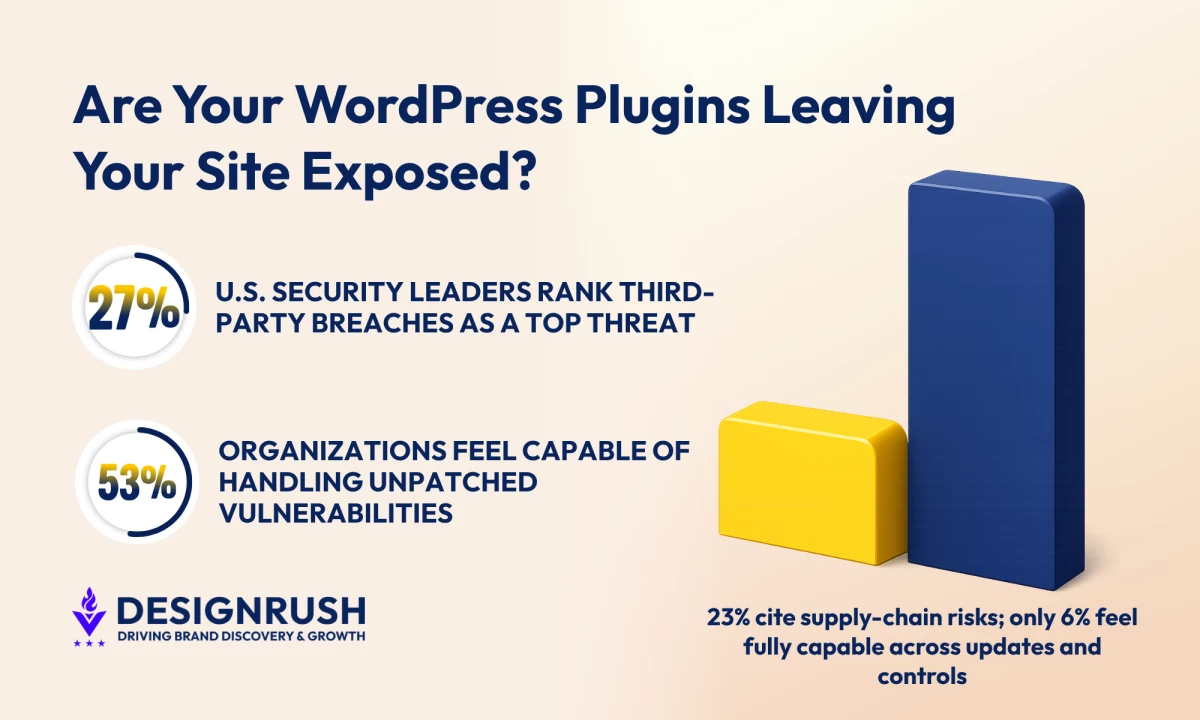
About 27% of security leaders rank third-party breaches among the top cyber threats they feel least prepared to address, while 23% cite software supply-chain compromise, according to PwC’s 2026 Global Digital Trust Insights.
The PwC report also found that only 53% of organizations feel somewhat capable of handling unpatched software vulnerabilities, dropping to 43% for supply-chain risks.
Leading website design company eSEOspace believes that patching and plugin updates are among the most crucial proactive tasks. The company has observed vulnerabilities appearing in public forums long before organizations apply fixes.
That wait time creates a window of opportunity for attackers.
“Ignoring updates is like leaving your digital front door unlocked in a hostile neighborhood. For business sites, that door often guards customer data, order histories, and administrative access,” says Irina Shvaya, founder of eSEOspace.
But Patching Alone Doesn’t Solve the Problem
Editor's Note: This is a sponsored article created in partnership with eSEOspace.
Managing plugins isn’t the same as ticking boxes, though.
Effective plugin maintenance requires:
- Testing updates in a staging environment
- Running visual regression checks
- Auditing user roles before going live
This is important because a single, overlooked plugin can bring an entire website offline or, worse, expose sensitive data.
“Most issues don’t come from what happens around the update.
“If you’re not testing changes in a staging environment, checking how they affect functionality, and reviewing who has access before pushing live, you’re taking unnecessary risks with your site,” Shvaya notes.
New plugin vulnerabilities are discovered regularly, often putting hundreds of thousands of sites at risk.
That level of discipline reduces immediate risk, but it doesn’t cover the full attack surface.
However, even a team strong at patching can be exposed if adjacent controls, such as admin access restrictions or monitoring coverage, are weak.
Only 6% are “very capable” of withstanding cyber attacks across all vulnerabilities surveyed, according to the same PwC report.
It’s one of the reasons why eSEOspace recommends three priorities for reducing plugin risk:
- Establish a plugin governance model
- Conduct proactive audits, including continuous scanning and staging tests
- Reviewing user access and role permissions
“In most cases, the issue isn’t whether teams apply updates; it’s everything around it.
“We’ve seen sites fully up to date on plugins but still exposed because access controls weren’t tight or activity wasn’t being monitored. That’s where problems usually start,” Shvaya says.
Implementing these steps ensures organizations cover the controls that create hidden exposure.
Governance, Real-World Threats, and Hidden Costs
Most development teams often control security tooling decisions, with 62% acting as decision-makers and 43% owning budgets, Forrester found in its State of Application Security report.
WordPress plugin lifecycles mirror this pattern, as plugin selection and deployment usually fall in the hands of digital or development teams rather than security.
As a result, extensions can go live with limited security review, especially when speed or functionality takes priority.
The better option is to formalize who can approve plugins, assign patch responsibilities, and enforce mandatory security gates.
Recorded Future’s 2025 Identity Threat Landscape Report shows the scale of data and access traded in underground markets.
Researchers tracked billions of compromised credentials, including database logins and admin access points, with 63% tied to authentication systems like VPNs and remote access tools.
That matters because these are exactly the assets attackers can get through a vulnerable plugin.
An outdated or poorly secured extension can expose database access, create unauthorized admin users, or leave entry points that attackers use to move through a website without being noticed.
Outdated plugins are still one of the easiest ways hackers get into WordPress sites. They scan for known vulnerabilities and, when they find one, can inject malware, steal data, or grab admin access.
Once that happens, search engines often step in. Malware or redirects can get a site blacklisted, taking it out of Google results and slashing organic traffic and revenue until it’s cleaned up.
According to Shvaya, once a plugin is exploited, use it to get what they need.
“In most cases, that means access to the database or admin panel, which is exactly what ends up being sold or reused for further attacks.”
It highlights the concrete steps organizations can take to prevent similar breaches:
- Consistent plugin reviews
- Offline testing
- Backups
- User role audits
“Consistency is what makes the difference. The sites that run into trouble are usually the ones where updates, backups, and access checks happen irregularly.
“Once you put a routine in place and stick to it, most of these risks become manageable,” Shvaya says.
Actionable Steps for Brands and Agencies
Companies need to see plugin maintenance as part of a wider operational risk strategy.
Why? Because plugins are a pathway to customer data, order systems, and administrative controls.
A single exploited extension can lead to downtime, revenue loss, and compromised customer trust.
Executives who ignore this are leaving the most valuable assets exposed to attackers.
But taking a structured approach can turn maintenance from a reactive task into a predictable, manageable process.
- Review all active extensions. Flag outdated or unsupported plugins and rank them by risk.
- Assign ownership for updates, set deadlines, and test all changes in a staging environment.
- Decide who can approve new plugins, track change requests, and enforce security checks. Keep installations limited to vetted options.
- Run regular scans, review user roles, and watch for unauthorized changes.
- Assume every plugin could expose data or admin access. Back up critical systems and plan for quick recovery.
Following these steps helps brands and agencies build a plugin security routine that protects both their websites and the business assets that depend on them.