
WordPress AI Plugins: Key Findings
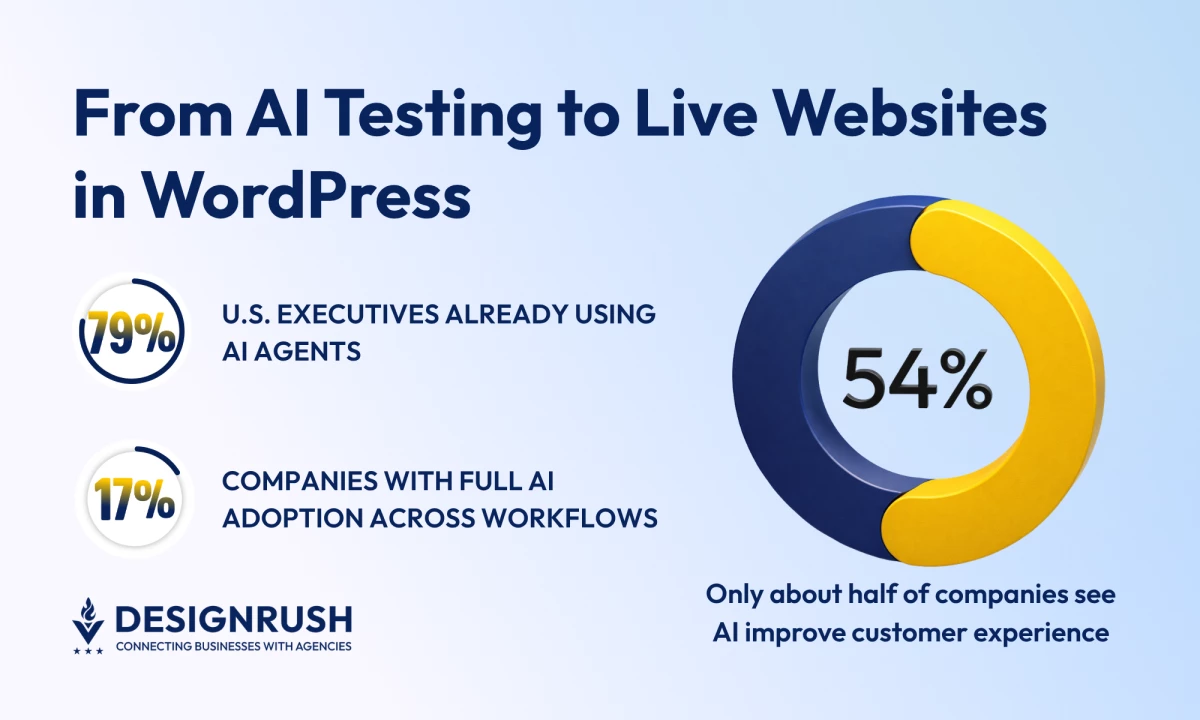
- 79% of U.S. executives report using AI agents, showing WordPress AI plugins let brands put AI features into live websites where teams are already experimenting.
- Only 17% of companies have fully integrated AI across workflows, making WordPress AI plugins a way to add AI without building custom infrastructure.
- 54% of companies say AI improves customer experience, emphasizing that WordPress AI plugins can shape website interactions when teams manage output and track results.
WordPress just made AI integration a lot smoother.
The release brings three plugins that link straight to OpenAI, Google Gemini, and Anthropic’s Claude.
Which means teams can now set up these plugins inside WordPress and start using AI features without building any infrastructure.
And most companies are already experimenting with AI, but seeing it in customer-facing products is still pretty rare.
How WordPress Plugins Make AI Work on Live Websites
Most organizations haven’t embedded AI across core systems, with only 17% of U.S. companies reporting full adoption across most workflows and functions, according to PwC’s 2025 AI Agent Survey.
Still, 79% of business executives say AI agents are already in use, and 54% report that adoption is improving customer experience, particularly at digital touchpoints.
Editor's Note: This is a sponsored article created in partnership with Baunfire.
With WordPress connecting existing AI models directly to the front end, those improvements now have a place to take hold.
The release focuses on direct integrations. Each plugin connects WordPress to a specific model ecosystem.
- OpenAI plugin: Enables content generation, summarization, and conversational features directly inside WordPress
- Google Gemini plugin: Supports multimodal inputs, including text and images
- Anthropic Claude plugin: Handles structured outputs and long-form reasoning
Developers can call these models through APIs without building infrastructure from scratch, which speeds up setup and keeps everything within the CMS.
That also shortens deployment cycles, letting features that once required custom engineering reach production much faster.
Baunfire, a Silicon Valley digital agency known for building high-performance websites and digital platforms that align design, UX, and technical execution for established brands and startups, has seen the value of tighter toolchains where engineering and content workflows are fully integrated.
Yagmur Ilgen, creative director at Baunfire, explains that the main challenge for teams isn’t generating ideas but moving them into production quickly:
“AI tools outside the CMS often stay in testing, but integrated within the CMS, they can actually ship.”
Teams that structure AI around real workflows can apply the same logic to attracting traffic, engaging visitors, and converting leads:
How AI Powers Website Features and Workflows
These plugins turn static websites into responsive systems. Users can interact with content, products, and support in more direct ways.
1. Intelligent content layers
AI can make website content respond to what a user is doing or looking for:
- Product descriptions can be updated based on user behavior,
- landing page copy can be personalized for each visitor, and
- long content can be summarized in real time.
That way, users see messaging that fits their actions or can get shorter, easier-to-digest versions of information.
2. Conversational interfaces
Chat can work across the entire site experience.
It can help users discover products through natural language, guide them with direct queries, and provide context-aware FAQs.
This lets people interact through conversation instead of navigating static menus.
3. Smarter search
Search can understand what users mean, not just the words they type.
It can deliver semantic results, offer context-aware recommendations, and connect information across pages.
That helps users find what they need with fewer dead-end searches.
4. Content operations inside the CMS
AI can help teams work more efficiently within WordPress.
It can draft and edit content, generate metadata and SEO fields, and translate or localize pages.
That allows teams to handle production all in one place.
“Most teams underestimate how much time goes into maintaining content. AI inside the CMS removes repetitive work. That frees up time for strategy and testing,” Ilgen adds.
Companies are investing in AI, but it’s still rare to see it in customer-facing applications.
Websites provide a way to put AI to work where it actually shapes the user experience.
WordPress makes the technical side easier, but results depend on a clear strategy.
Without a clear purpose, AI features fail, chat tools don’t answer questions, content misses the mark, and features sit unused.
Baunfire’s work focuses on building websites with strong UX and technical execution that drive engagement and conversion, showing how disciplined digital platforms help clients put strategy and tools to work effectively.
When AI features are integrated into these platforms, teams can move from testing to live experiences quickly, making every deployment immediately relevant to users.
Best Practices for Implementing AI on Websites
The plugins simplify deployment, but they don’t remove the need for structure and oversight.
Start with a single use case
Focus on one area, such as product discovery, customer support, or content personalization, then define success metrics and track performance to see what actually works.
Align AI output with brand voice
Models work best with clear direction.
It helps to have tone guidelines, approval steps, and prompts trained on your existing content, which keeps everything consistent and builds trust.
Design for transparency
Users need clarity, too.
So, label AI responses, have some fallback options, and make it easy for people to reach a human when they need one.
That way, everything stays clear and simple to use.
Monitor performance continuously
AI systems need regular check-ins.
Keep an eye on engagement, audit what the AI produces, and tweak prompts and settings as needed.
Plan for data handling
AI integrations work best when data flows are clear.
Decide what data gets used, protect sensitive information, and follow the rules to keep things running safely.
“The biggest risk is not the technology, it’s poor implementation. Brands rush to add features without thinking about the user journey. That creates confusion instead of value,” Ilgen noted.
What brands and agencies can learn
AI features on websites work when they solve user needs.
WordPress plugins might make it easy to embed AI where visitors interact, but the impact comes from focused application.
Teams that run content, search, and chat through the CMS can move faster, maintain consistency, and see which features influence engagement.
Clear rules for tone, output, and monitoring should be implemented to ensure AI supports user tasks rather than creating noise.
“Pick one use case, launch it quickly, and track how people use it. The usage data shows what works, what doesn’t, and what to expand next,” Ilgen explained.
The plugins provide access, but results depend on execution.
Brands and agencies that apply AI directly in workflows and measure the outcomes will create stronger, more usable experiences for visitors.