
WCAG 2.2 Enterprise Web Accessibility: Key Findings
- Most enterprise systems still fall short on accessibility, with widespread WCAG failures highlighting a systemic gap across the digital landscape
- WCAG 2.2 shifts the focus to real usability, placing greater emphasis on how people interact with systems rather than simply meeting technical requirements
- Accessibility must be built in from the start, as integrating it early in the design process reduces costs and leads to more effective, user-friendly systems
Yes, accessibility is present in enterprise software. The problem is that it’s often introduced too late, after systems are already defined.
Despite knowing that web accessibility matters, teams have frequently neglected to build it into how systems were designed from the start.
This pattern is starting to change as accessibility becomes a factor in how enterprise systems perform. It’s no longer just about compliance, but how well systems actually work in day-to-day use.
Chris Gieger is a co-founder of UX Team, a leading evidence-based UX and UI design agency. And he says many organizations are still playing catch-up as standards like WCAG 2.2 continue to evolve.
WCAG 2.2 (Web Content Accessibility Guidelines), developed by the World Wide Web Consortium, sets the global standard for designing digital products that are accessible and usable for people with disabilities.
“As digital environments become more complex, accessibility can’t be treated as an afterthought,” Gieger says. “It needs to be baked into the design from the very beginning.”
“WCAG 2.2 is pushing teams to look more closely at how their products actually function for real people, not just whether they meet technical requirements.”
Gieger explains why accessibility is important in the video below:
Editor's Note: This is a sponsored article created in partnership with UX Team.
Why Most Websites Still Fail Accessibility Standards
The scale of the accessibility challenge becomes clearer when you look at the data over time.
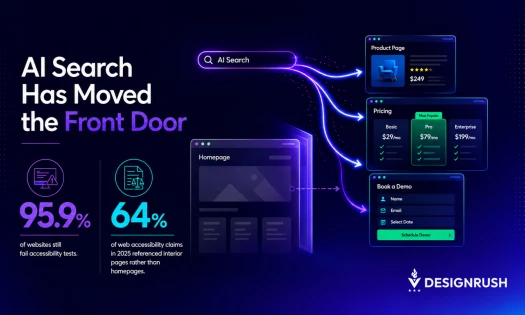
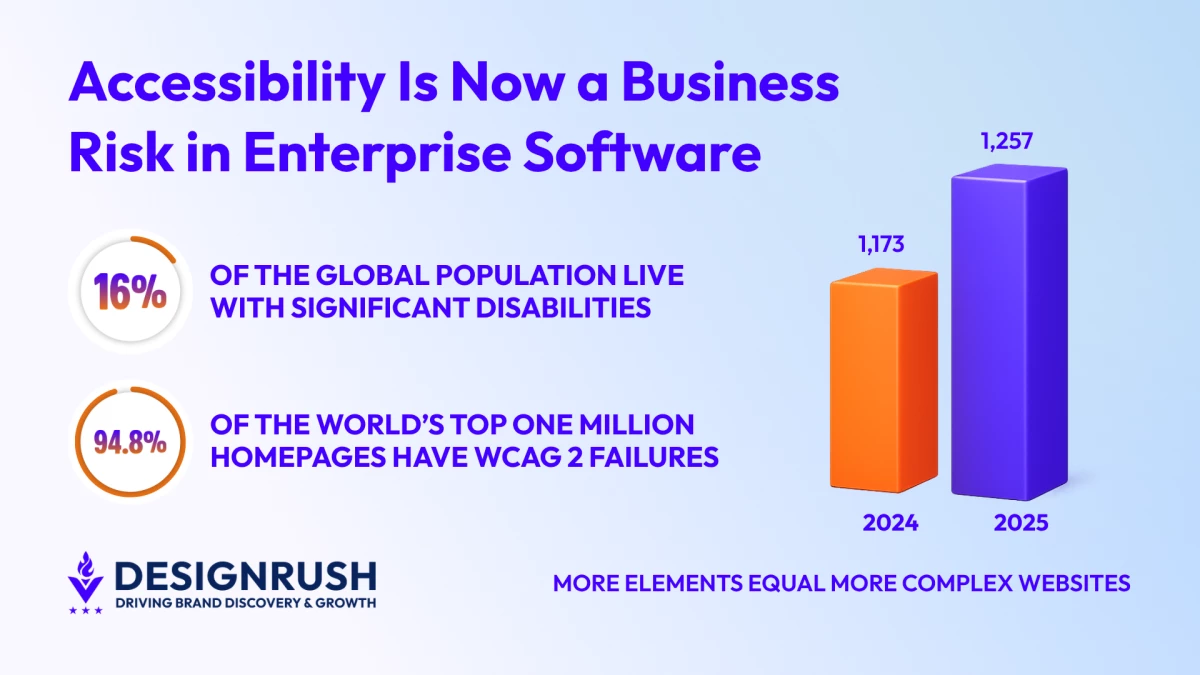
Data from WebAIM’s Million reveals 94.8% of the world’s top one million homepages had detectable WCAG 2 failures in 2025.
That’s a marginal drop from 95.9% in 2024, showing almost no improvement in reducing accessibility errors across top websites.
The report also suggests that the average homepage flags around 51 accessibility issues per page, and most of them are not buried in complex code.
They’re the kinds of things people run into every day without necessarily knowing why something feels off.
Surprisingly, a lot of these come down to basics that are being missed, such as text that is difficult to read because of low contrast and images with no alternative text at all.
Websites, too, are becoming heavier and more layered.
Homepage complexity went up by 7.1% last year, with the average number of elements increasing from 1,173 to 1,257.
And as pages continue to grow in size, structure, and complexity, keeping accessibility top of mind is becoming even more critical.
With 1.3 billion people, or 16% of the global population, living with significant disabilities, this accessibility limitation is not just a technical gap, but a decision that impacts billions and their right to information.
“It can't be resolved on its own,” Gieger says. “The gaps are growing alongside the expansion of the digital landscape, and the only ones who can take control of this are the people developing these platforms.”
Gieger explains why accessibility is not always top of mind for some organizations:
Why Accessibility Is Now a Business Risk for Enterprise
The development of enterprise software is not just about external user experiences, but also supports the internal systems that keep organizations running.
This includes departments such as human resources and financial management, which make use of complex dashboards and other mission-critical processes.
“When accessibility is missing in these environments, the consequences show up quickly,” Gieger says.
In practice, that impact is immediate:
- Reduced employee productivity
- Lower adoption rates
- Increased inefficiencies and errors
- Higher compliance risks
- Loss of credibility in inclusion efforts
There is also a growing legal element to this, with 4,975 digital accessibility lawsuits filed in the United States last year alone.
“Still, beyond legal exposure, the bigger issue is operational. Systems that are harder to use inevitably slow people down, and that has a direct impact on performance,” Gieger says.
The post below outlines the business requirements of the Americans with Disabilities Act (ADA), and why your website should comply with these standards:
What WCAG 2.2 Changes for Enterprise UX Teams
The Web Content Accessibility Guidelines act as the global reference point for digital accessibility.
WCAG 2.2 builds on what came before in version 2.1, but the shift is not really about adding more rules.
It’s more about tightening how those guidelines work in real situations and how they hold up in everyday use.
The guidelines zero in on how people actually use digital experiences:
- Keyboard accessibility is more clearly defined for interactive elements
- Focus indicators are easier to see and follow
- Cognitive load is reduced through clearer structure and fewer distractions
- Error prevention and correction are more robust
- Support for users with limited motor control has been expanded
“These are not abstract improvements. These address the friction that shows up in everyday use, particularly in enterprise systems that are often complex and data-heavy,” Gieger says.
The post below dispels some common misconceptions when it comes to WCAG compliance:
WCAG 2.2 vs Section 508: What Teams Need to Know
Many enterprise organizations, particularly those working with federal agencies, rely on Section 508 as their primary accessibility benchmark. And while it remains important, it’s aligned with older WCAG 2.0 Level AA standards.
WCAG 2.2 incorporates newer criteria focused on cognitive accessibility and better aligns with modern interaction patterns and digital environments.
“For practical purposes, this creates a gap,” Gieger says. “Meeting Section 508 may satisfy minimum requirements, but aligning with WCAG 2.2 signals a more mature approach to user experience.”
Even the smallest enhancements, such as tweaks to touch targets, often get overlooked. This shows why accessibility guidelines are just the baseline, and not the finish line:
Why Fixing Accessibility Late Is Costly and Ineffective
The most common pattern across most enterprise teams is that the issue of accessibility only arises once in the development phase and often just before release.
By that point, decisions such as an established system architecture, interaction models, and design systems are already in place, with stakeholders already invested in the current product.
Making meaningful changes at this stage is not only difficult, but disruptive and expensive. More importantly, it rarely leads to the best outcome.
“Accessibility affects foundational aspects of design, including information architecture, workflow logic, form design, error handling, navigation patterns, and interaction timing,” Gieger says. “These decisions need to be made early to be effective.”
While many organizations rely on automated testing and tools to ensure compliance, UX Team believes that only humans can catch these 10 accessibility issues:
How Teams Are Building Accessibility Into Design Early
The more effective approach is to integrate accessibility from the beginning rather than layering it on later.
At UX Team, this thinking is embedded in its human-centered and AI-assisted Evident methodology. This is done by ensuring that:
- Accessibility is considered during discovery and research
- Personas and user journeys reflect a range of cognitive and motor abilities
- Wireframes and prototypes are evaluated against WCAG 2.2 before visual design begins
- Design systems are built with accessible components by default
- Validation includes testing with assistive technologies
“This approach reduces risk, improves usability, and avoids costly rework,” Gieger says. “Accessibility becomes part of how products are designed, not something that is revisited at the end.”
The post below delves deeper into UX Team’s Evident methodology:
What Enterprise Leaders Should Do for WCAG 2.2
For organizations looking to move forward, Gieger suggests the following practical steps that can be easily achieved:
- Start with a comprehensive accessibility audit aligned with WCAG 2.2
- Review design systems to ensure accessible patterns are built in
- Train product and engineering teams on updated guidelines
- Integrate accessibility into planning, roadmaps, and development cycles
- Move beyond minimum compliance toward higher standards
“Accessibility is no longer just about meeting requirements. It’s becoming part of governance, performance, and long-term product strategy,” Gieger says.
Gieger details some accessibility best practices in the video below:
WCAG 2.2 Is Forcing a Shift Enterprise Teams Can’t Ignore
While WCAG 2.2 doesn’t change the problem, it does make the issue harder to ignore.
And while many will heed the call and adjust how they work from the start, others will carry on and leave accessibility until later and deal with the same issues down the line.
The question is, which category will you fall in?
Want to make sure that your website meets WCAG 2.2 guidelines?
Take a look at our Top UI/UX Design Agencies of 2026.