
UX for Agentic AI: Key Findings
- PwC shows 88% of executives are increasing AI budgets, but only 42% are redesigning processes around AI agents, meaning brands risk slow adoption unless UX and decision flows are redesigned.
- Handing agentic AI decision authority without redesigning UX slows adoption and weakens user confidence, which can hurt business outcomes.
- Mapping decision flows, clarifying ownership, and showing AI actions make experiences intuitive, which helps brands embed agentic AI faster and reduces time fixing trust or control issues.
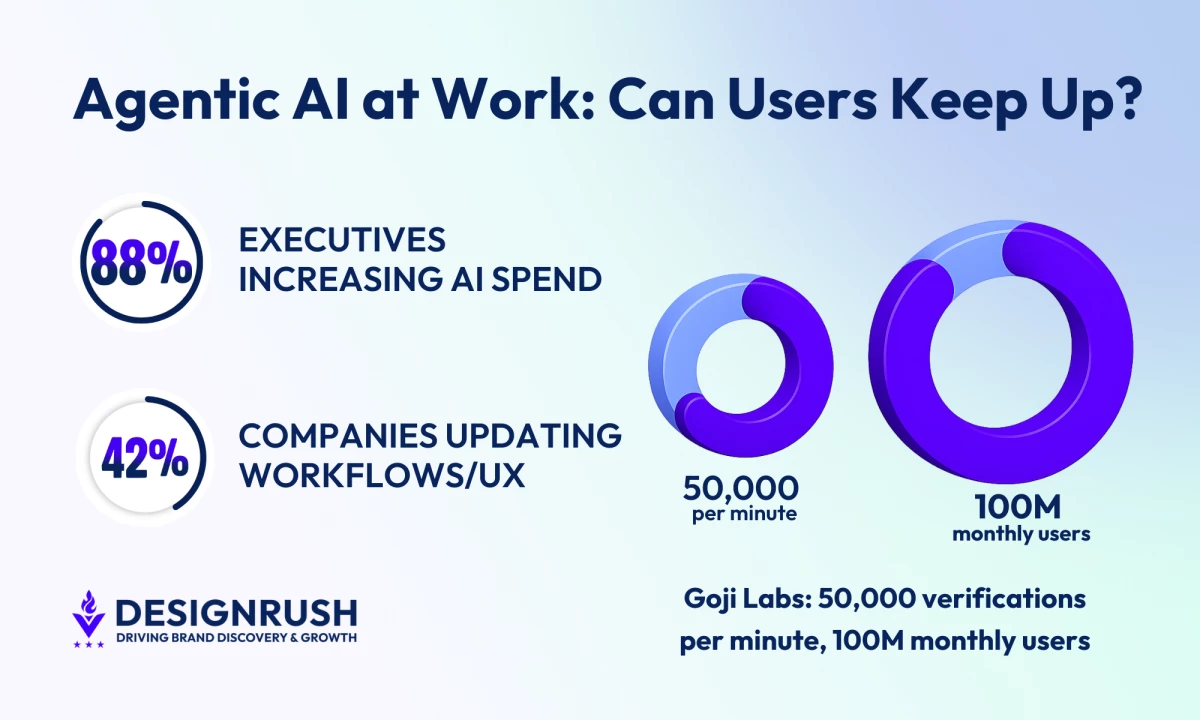
Eighty-eight percent of executives are increasing AI budgets for agentic systems, yet only 42% are redesigning their processes to support them, according to PwC’s 2025 AI Agent Survey.
This means most companies risk slow adoption unless processes are mapped and redesigned first.
Thus, AI is being given decision authority inside products, but the surrounding workflows often stay untouched.
Agents are approving requests, updating records, routing tickets, triggering workflows across enterprise platforms.
Digital product agency Goji Labs has built systems that verify 50,000 users per minute and handle over 100 million monthly users.
Its experience shows how workflows need to be clear and actions visible for people to trust and use these systems effectively.
When those actions run through interfaces designed for manual work, people can’t see what triggered the change or how to step in and adjust it.
The issue with this is that it slows adoption and weakens user confidence in the system’s decisions and reliability.
Goji Labs encounters this during early product strategy discussions.
Editor's Note: This is a sponsored article created in partnership with Goji Labs.
Leadership approves AI investment quickly because the upside is visible.
Redesigning decision flows across product, design, and operations requires coordinated planning, and when that planning is delayed, confusion shows up inside the live product.
Why UX Lags Behind AI Investment
According to David Barlev, co-founder and CEO of Goji Labs, it’s easier to fund AI than to rethink workflows.
Barlev says budget decisions often happen at the infrastructure level, while UX changes require broader organizational alignment.
“Agentic systems alter how decisions are made, how feedback loops operate, and how users maintain control,” Barlev says.
“Without redesigning processes, you’re simply layering automation onto a system that wasn’t built for it.”
AI agents alter responsibility, initiate tasks without prompts, and act on signals, which affects approvals, oversight, and accountability.
McKinsey & Company’s 2025 State of AI research is seeing the same thing.
Companies are spending heavily on AI, but many aren’t seeing the impact because the way work actually gets done hasn’t changed.
Autonomous systems don’t just add a feature; they change how decisions are made.
This means teams need to map how decisions flow before adding AI features.
If daily workflows aren’t adjusted, AI stays bolted on instead of becoming part of how the business runs.
In practice, adoption comes down to process design.
The way daily work is structured determines whether AI becomes part of how the business actually runs.
The UX Mistakes That Undermine Adoption
The most common UX mistake teams make when integrating agentic AI is not showing users what the AI is doing and why.
Barlev noted that AI agents can perform tasks, update records, or trigger workflows.
But if the interface doesn’t show why actions happened or how users can intervene, people get overwhelmed or stay in the dark.
“Another common mistake is unclear ownership. When an agent acts, users need to know why, what changed, and what they can override. Without that clarity, trust erodes quickly,” Barlev says.
Agentic systems need to show what they’re doing in a way users can follow.
People have to get the AI’s intent and what its actions actually mean.
If an agent updates a contract field or reroutes a ticket, the interface should make it clear what caused it and how users can step in or undo it.
Deloitte’s 2025 Global Human Capital Trends report points out that companies using AI have to make decision rights and accountability obvious.
Employees trust AI more when it’s clear who is responsible for decisions and what they can override. Interfaces should make ownership obvious so people feel in control.
Good product design builds that confidence. When ownership and control aren’t clear, people hesitate, and adoption slows.
Making Agentic Systems Intuitive and Explainable
Goji Labs’ checklist for explainable agentic systems:
1. Define the human role. Are users supervising, collaborating, or delegating? The interface should reflect that relationship.
2. Show intent by default. Make it obvious what the AI is trying to do at the right level of detail.
3. Reveal reasoning when needed. Let users dig deeper without overwhelming them.
4. Make actions reversible. Users should be able to step in and undo decisions easily.
5. Match the interface to the role:
- Supervising: Surface decision checkpoints so users can monitor actions.
- Delegating: Show summaries and highlight intervention options.
- Collaborating: Provide shared visibility so everyone sees the same state.
“Explainability isn’t a tooltip problem,” Barlev says.
“It’s about system architecture and UX clarity from the ground up.”
Gartner’s 2025 guide on AI governance and product design found that companies that build oversight and transparency into how their systems work see people actually use the tools more, and can scale operations without constant headaches.
Teams that show what the AI is doing and why see higher usage. Making reasoning visible keeps users confident and avoids constant questions or errors.
Teams often start by listing what AI can do: draft, approve, route, summarize, predict.
Those are the features, but what matters next is how decisions actually flow.
“Before writing code, teams need to map decision flows, not just features,” Barlev says.
“Where does the agent act? Where does the human step in? What signals matter? We run strategy sprints that lay out those interaction models up front. This keeps the roadmap from turning into a list of AI features that don’t fit together.”
Mapping flows makes teams answer practical questions:
- Who owns the outcome?
- What triggers an override?
- When does human review happen?
McKinsey & Company’s research shows that organizations that plan workflows and decision rights first can embed AI into daily processes and scale more smoothly.
When product strategy treats AI and UX together, users see what is happening and adoption follows naturally.
UI Patterns That Show How Brands and Agencies Can Build User Confidence
Goji Labs points to three patterns that help users feel in control of agentic systems:
- Show state changes clearly. The system displays what is happening in real time so actions are easy to follow.
- Layer transparency. Deeper reasoning is available without cluttering the main interface.
- Provide undo and control options. Users can step in and reverse automated actions easily.
Barlev says these interface signals help users understand what the system is doing and when they can step in.
“Agentic systems need to show what they’re doing in ways people can follow. When users can see what changed, why it happened, and how to step in, confidence builds quickly,” he says.
When these patterns are applied, users feel informed and empowered.
Uncertainty is reduced, and adoption stabilizes.
This gap between AI investment and process redesign explains why adoption often stalls.
Multi-agent systems are now running in workflows across finance, healthcare, logistics, and internal operations.
Goji Labs’ strategy sprint helps define decision flows, ownership, and interaction models before features are locked in:
Thoughtful UX design determines whether users trust these tools and use them effectively.
For brands and agencies, putting these patterns into practice alongside AI funding leads to faster adoption and less time spent fixing trust or control issues after deployment.