
Microsoft 365 Icon Redesign: Key Findings
- A new design language defines the Microsoft 365 suite, replacing sharp lines with curves that reflect a more human, connected workflow.
- The refreshed icons mirror the tech giant's Copilot integration, turning AI from an abstract concept into a visual cue for intelligent productivity.
- Microsoft’s 84.4 million subscribers make every design choice significant, showing how the new visual language signals the next phase of its workspace.
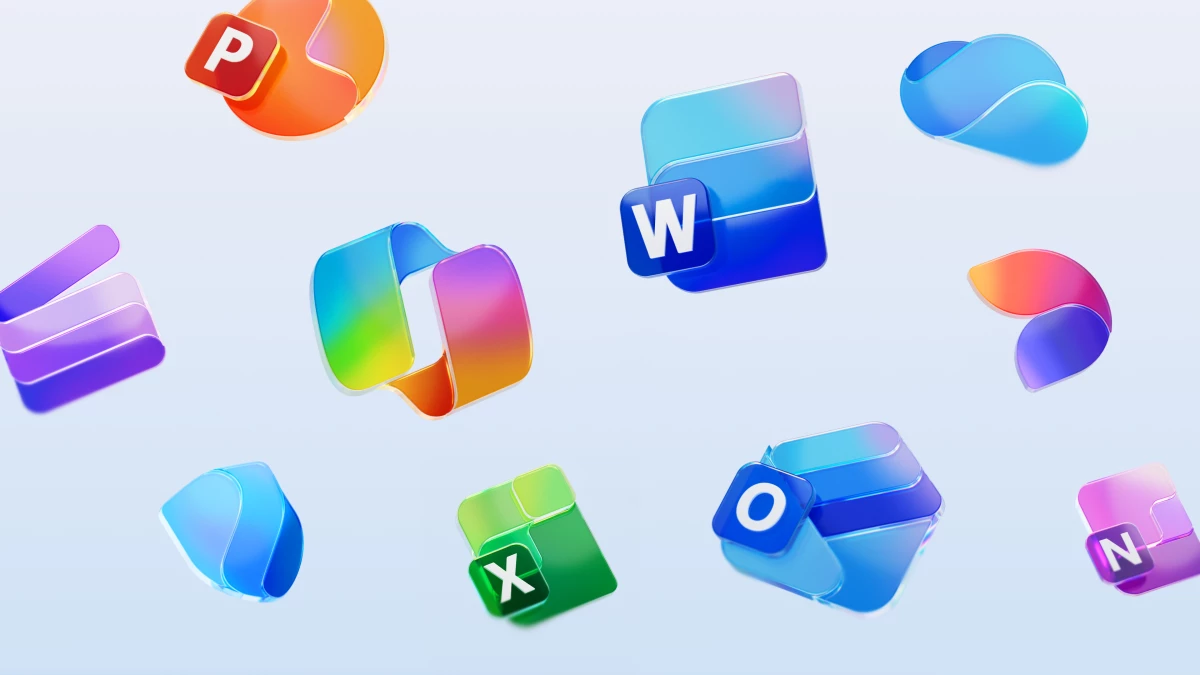
A new set of Microsoft 365 icons was introduced this month across ten of its core apps, including Word, Excel, PowerPoint, OneNote, Outlook, and Teams.
The update replaces the hard geometry of earlier versions with curves, light gradients, and a smoother sense of motion.
Copilot, which had an influx of corporate subscribers in May, sits at the center of this change, shaping how every element connects within the suite.
The rollout comes during a period of steady growth, with Microsoft 365 subscriptions up 10% year-over-year to 84.4 million in September 2024.
Copilot is now embedded across the suite and has quickly become part of how users work.
The icons were rebuilt to reflect this shift, giving form to the company’s effort to make AI feel familiar, practical, and human in the day-to-day use of its tools.
A Softer Look for a Sharper Era
Microsoft last updated 10 of its core Office icons in 2018, which featured flattened icons.
Now, this new version pulls the focus on continuity and motion, toward "evolution, not revolution."
Edges have been rounded, folds have been added, and each icon moves visually with a sense of depth and texture that earlier versions lacked.
Each app now carries a gradient that shifts naturally from one tone to another.
Word moves from one vibrant blue to another, PowerPoint from red orange to yellow, and Excel from forest green to mint.
Together, the colors form a single visual design system that connects the entire suite.
"The new icons emanate a sense of fluidity and play, while also being simpler, more intuitive, and highly accessible," Microsoft 365 CVP of Design and Research Jon Friedman wrote in the company's Design blog.
"Their metaphor, shape, color, and letter have been redefined to create a cohesive, discoverable, and navigable system, crafted with gradients and gestures woven into Microsoft’s AI expression and experiences."
The result looks and feels cohesive without losing the identity of each app.
The logo redesign captures how people now experience Microsoft 365: as one continuous environment built for flow rather than a cluster of separate programs.
Across the industry, gradients have become shorthand for intelligent design systems, a way to signal motion and adaptability.
Apple, Google, and Meta have each adopted similar color philosophies in their AI-era branding.
Google's gradient logo is going company wide https://t.co/iGxtHC8dbhpic.twitter.com/CoGZsofNv3
— Barry Schwartz (@rustybrick) September 29, 2025
Microsoft’s version feels grounded in productivity, using color and style to show that connection and function while visually stimulating its human users.
"The most interesting part of this update is how Microsoft uses design to manage perception at scale," Katy Briggs, managing director at global branding firm Willoughby Design.
"Every curve and color choice carries the weight of a brand that operates across cultures and devices. Good design at this level is all about consistency, legibility, and trust.
When done right, it becomes a system that teaches people how to feel about the brand without saying a word.”
Design as Communication
Every interface carries meaning, and Microsoft’s new icons tell a story about accessibility and clarity.
- Color carries meaning. Stronger gradients improve legibility and help users recognize tools quickly across devices.
- Form follows connection. Curves echo how Copilot links applications, creating a sense of movement across the suite.
- Simplicity scales trust. Cleaner structures keep familiar icons readable even as new features arrive.
For a tech company balancing enterprise systems and personal users, these updates bring cohesion without confusion.
The redesign reintroduces warmth into an environment long defined by corporate precision, signaling that utility and personality can coexist.
Our Take: Can Design Make AI Feel Human?
I think this redesign shows that it can.
Microsoft’s icons bring warmth back to tools that once felt distant and futuristic.
The motion, color, and softness give AI a visible personality that feels familiar instead of abstract.
The software pioneer has managed to turn a technical evolution into something personal, grounding its AI identity in a design language that feels human.
It’s definitely a rare moment when brand identity and technology move in the same rhythm.
Color and form can speak louder than words.
These top logo design agencies help brands communicate clarity and warmth through precise, modern visuals.