AI-Powered Service: Key Findings
- 95% of customer interactions predicted to be AI-powered by 2025, but poor UX can erode consumer trust and satisfaction.
- Companies are seeing 25% cost reductions and a $3.50 ROI per $1 from AI, but only when digital design is optimized.
- Mobile-first, conversion-focused frontends are now essential for AI-driven customer experiences to feel credible.
One of the earliest use cases for AI was in customer service, often the first point of contact between a brand and consumers.
But now, this use case has become the standard.
By the end of 2025, 95% of customer interactions will be AI-powered, according to a new Fullview report.
The same study found companies already reducing service costs by 25% and earning $3.50 for every $1 invested in AI.
But as automation becomes the norm, brands face the challenge of keeping their digital experiences smooth enough for customers to actually trust AI.
While AI systems are advancing rapidly, they’re still only as effective as the platforms they run on.
McKinsey’s 2024 Global Survey reveals that 44% of company respondents have reported negative results from AI adoption, such as inaccuracies, cybersecurity risks, and IP infringement.
-content-large-webp.webp)
Those numbers show that while AI systems have become more autonomous, user trust can erode quickly when interactions feel unreliable or unsafe.
That’s where UX design steps in, not as a fix for the tech itself, but as the front line for rebuilding confidence through clarity, speed, and consistency.
However, the gap between smart technology and bad execution can be costly.
When it comes to speed, Akamai research shows that a one-second page delay reduces conversions by 7%, proving that user experience remains one of the most powerful drivers of trust and retention.
This is why agencies like KOPI, which operates across China, Singapore, and Finland, are focusing on performance-driven website design and localization instead of purely aesthetic redesigns.
They ensure that automation works seamlessly across markets by treating UX as the foundation of AI credibility.
“When the experience feels natural, people stop thinking about the technology and just start using it,” said Jeremy Koh, CEO and co-founder of KOPI.
For today’s mobile-first consumers, speed equals reliability.
With 62% of users preferring chatbots to waiting for human support, even minor lags in interface performance can make advanced AI tools feel broken or impersonal.
The New Frontline of AI-Driven UX
The Fullview report also notes that customer service is now entering a visual phase.
AI systems now have the ability to guide users through on-screen steps or even perform actions within interfaces.
These “visual AI guidance” systems promise faster, more intuitive service, but they also depend heavily on how well a site performs.
A laggy or confusing interface doesn’t just frustrate users but also makes AI itself look untrustworthy.
That’s why optimizing page load speed, improving accessibility, and simplifying design are now central to building customer confidence in automation.
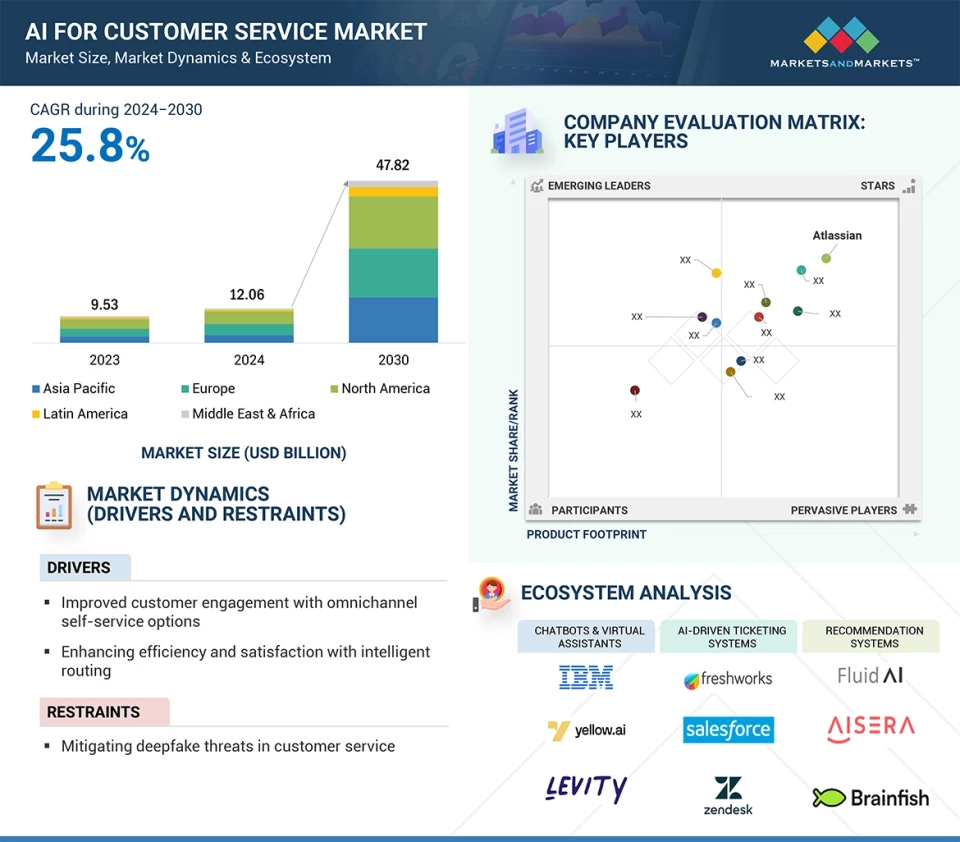
Experts estimate that the AI customer service market will reach $47.82 billion by 2030, with companies that integrate AI and UX seeing the highest returns.
Agencies positioned for this shift, like KOPI, emphasize conversion-focused design that enhances trust, particularly for brands looking to enter mobile-dominant regions such as Southeast Asia and China.
Design Experiences That Still Feel Human
Overall, what these numbers really show is that the AI race isn’t about automation anymore.
It’s about how human the experience still feels.
“AI may start the conversation, but UX determines whether users stay engaged. The challenge now is designing interactions that feel intelligent without feeling mechanical,” Koh said.
To achieve this, brands should focus on the following:
- Prioritize Speed as a Signal of Credibility. Every delay chips away at trust. Optimize load times and responsiveness to show users that both your brand and your AI can keep up with their expectations.
- Design for Effortless Clarity. Reduce cognitive load by simplifying layouts, visual cues, and copy. When users instantly understand what to do next, confidence in automation rises.
- Humanize Microinteractions. Subtle animations, conversational tone, and visual feedback can make digital interactions feel more alive. These small design touches bridge the emotional gap between people and AI.
- Make Accessibility a Non-Negotiable. Inclusive design is both strategic and ethical. Ensuring access across devices, regions, and abilities builds credibility and expands your market reach.
- Test and Iterate with Real Behavior Data. Move beyond assumptions. Use heatmaps, user sessions, and A/B testing to see how people actually engage with AI-driven features, then refine continuously for seamless interaction.
Is UX the Real Test of AI Trust?
The smartest AI is invisible. But the moment an interface lags or confuses, trust evaporates.
That’s why UX is the real frontier of AI.
It’s not about teaching machines to sound more human but about making technology feel effortless.
For brands investing in automation, the difference between “AI-powered” and “AI-trusted” starts with a basic question: How fast can your website load?