
Hosting Factors That Affect AI Visibility: Key Findings
- Fast hosting improves conversion rates and AI visibility. Google’s AI Overviews serve more than 2 billion users every month, giving little tolerance for slow-loading sites.
- Global delivery and scalable hosting through CDNs ensure strong performance. Gemini 3 powers Search for 650+ million app users and is adopted by over 70% of Google Cloud customers.
- Allowing AI crawlers access while keeping security strong increases the chance of ranking. ChatGPT and Perplexity check availability and trust before surfacing content.
Google launched Gemini 3, rolling it into Search’s AI Mode, on Nov. 18.
AI Overviews now serve more than 2 billion users every month, pushing Gemini 3 to retrieve and process content at a massive scale across a wider range of sources.
Gemini is used by over 650 million monthly app users and adopted by more than 70% of Google Cloud customers.
Which means Search increasingly relies on fast servers, stable uptime, and quick-loading pages to access content in real-time.
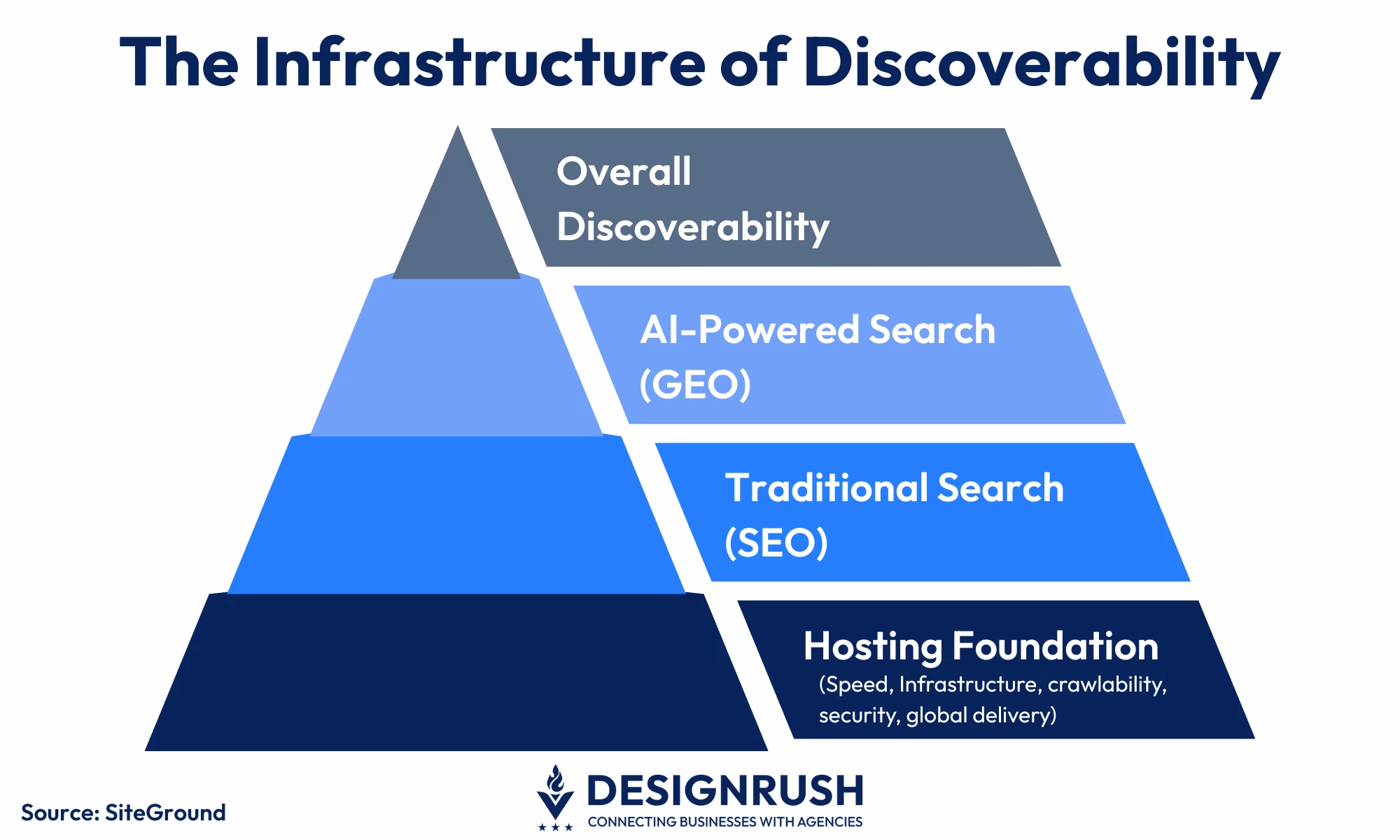
Now, hosting isn’t just about keeping a website online. It’s directly tied to whether your site gets discovered, not just by Google but also by AI-driven search engines that are changing how people find information.
ChatGPT Search, Perplexity, Google's AI Overviews, and other AI-driven discovery tools read the content and check website speed, structure, and reliability before deciding if it's trustworthy.
This means that poor hosting can render even well-designed sites nearly invisible to search engines and AI assistants.
For web professionals, understanding which hosting factors truly matter has become a competitive necessity.
Here are the five critical hosting factors that can make or break websites' visibility:
Editor's Note: This is a sponsored article created in partnership with SiteGround.
1. Page Speed
Page speed has been a Google ranking factor since 2021.
AI search tools like ChatGPT and Perplexity need answers fast. If a site is slow, it might not even get noticed.
Why It Matters
AI engines have just milliseconds to choose sources. That’s why: slow servers simply don't make the cut.
Server speed affects how users experience a site, including how fast pages load, how quickly they respond, and how stable the layout feels.
When these Core Web Vitals are strong, users stay engaged, and search engines and AI tools recognize the website as reliable.
To get real value from AI, each department needs the right tools:
Weak server performance drags everything down, and no amount of image optimization or clever code fixes a slow host.
What to Look For in Your Hosting Provider
- Time to First Byte (TTFB) measures how quickly a server starts sending data after a request. It’s only one site performance metric, though. Real-world speed also depends on caching, database load, and configuration.
200 – 400 ms: excellent
400 – 600 ms: good
600+ ms: potential issue
1000+ ms: likely infrastructure or setup problem - Modern hosting should include server-level caching, automatic image compression, lazy loading, and HTTP/3 support without requiring manual configuration.
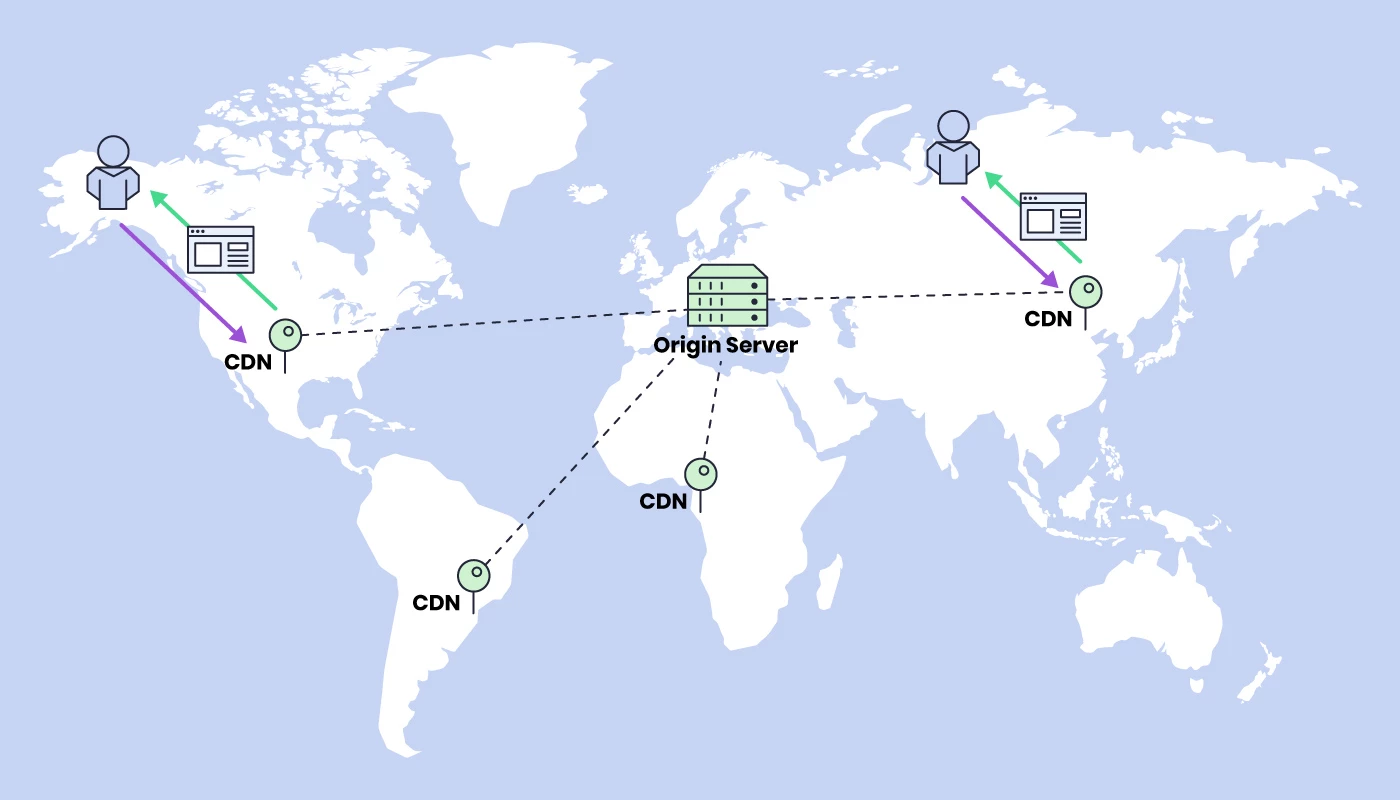
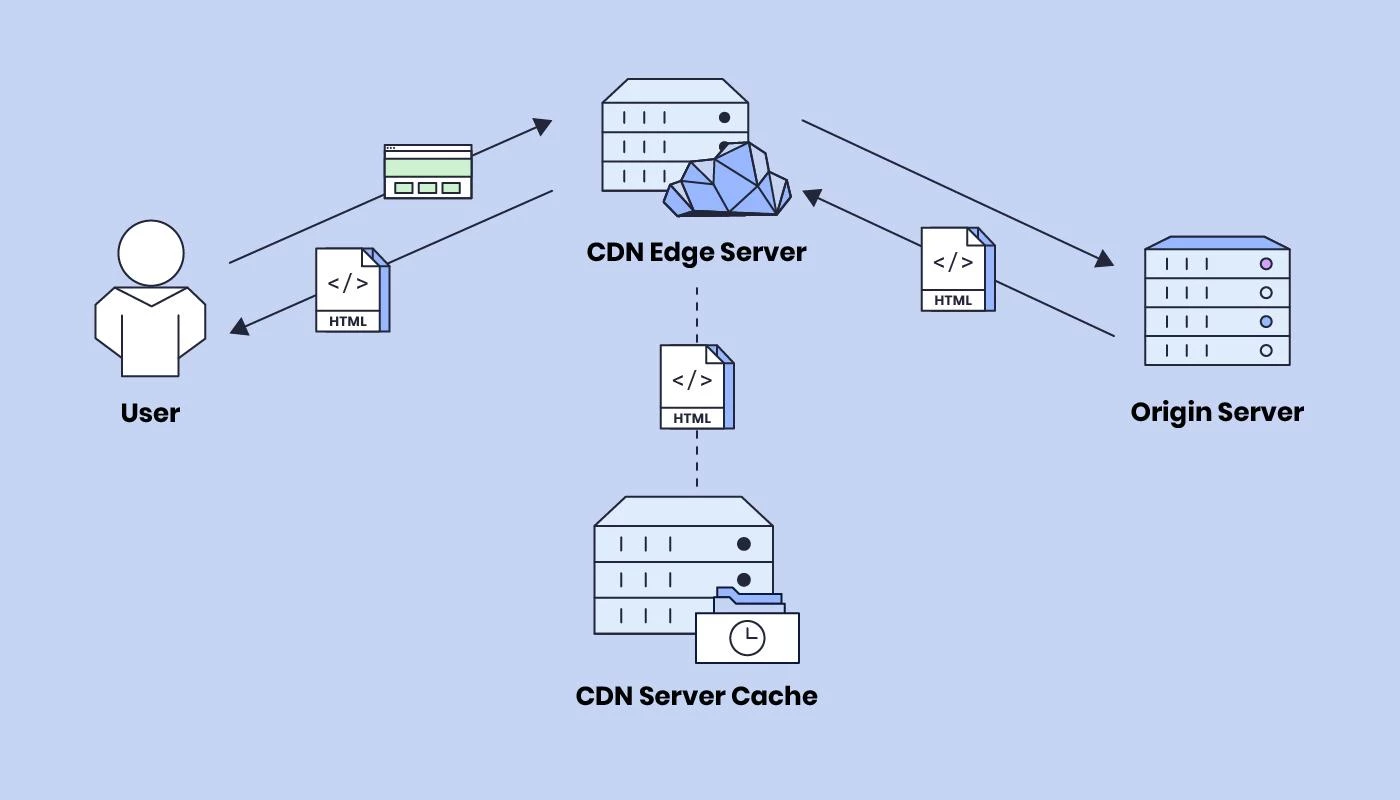
For example, the SiteGround Speed Optimizer plugin takes care of front-end resource optimization automatically. It comes pre-installed for SiteGround customers and is also available as a free download for anyone on another host. - A content delivery network (CDN) distributes static assets across dozens or hundreds of global locations, ensuring consistent performance no matter where users (or AI crawlers) are located.
Modern hosting should either include CDN integration or provide seamless connectivity to major CDN providers. - Look for hosting that offers layered caching at the server level. Doing so reduces database load and speeds up how quickly pages are generated.
SiteGround includes these caching layers by default, which helps deliver consistently fast server-side performance.
Server Location & Global Delivery
The closer your servers are to your audience, the faster your site loads.
Server placement directly affects rankings because it shapes how Google and AI search engines evaluate accessibility and authority across regions.
Why It Matters
Geo-distributed hosting affects content performance in location-based and AI-driven search results.
Google favors sites that load quickly in a user’s area, while AI engines prioritize sources that are relevant and nearby.
Sites that load smoothly across multiple regions reflect strong infrastructure, which search engines and AI systems interpret as a sign of credibility.
In short, proximity improves performance, and performance drives visibility.
What to Look For
- Hosting providers with multiple data centers across continents improve site speed by being closer to visitors.
The best providers allow choosing or switching data center locations without downtime. - Automatic CDN integration ensures a site’s static content, such as images, CSS, and JavaScript, is delivered from the nearest server.
Edge caching keeps frequently used content close to users, taking the pressure off the main server.
3. Technical Infrastructure & Scalability
Mentions in AI summaries or results can trigger instant surges, while AI crawlers constantly scan sites for up-to-date data.
If hosting can’t handle the load, slowdowns and downtime make search engines and AI systems crawl less often or skip sites entirely.
Staying on top of SEO means keeping up with trends and how they’re changing the way content gets discovered:
What to Look For
Hosting should allow CPU, memory, and bandwidth to scale quickly as traffic grows.
Modern servers like NGINX, running PHP 8+ and HTTP/3 on reliable infrastructure, handle high traffic more efficiently.
It's also important to choose hosts that support optimized MySQL or MariaDB setups with query caching and indexing because databases often become bottlenecks during spikes.
4. Crawlability & AI Access
Behind every search result and AI citation is a crawler that must access and read the content.
Hosting determines whether that process succeeds because server rules and security settings control crawler access.
Why It Matters
Some hosts block AI crawlers that resemble scrapers or spam bots.
When real AI crawlers are blocked, content gets cited less often, and the brand might not appear in AI-generated answers on tools like ChatGPT or Perplexity.
Hosting should allow recognized AI crawlers access while still blocking malicious traffic. It should also be able to tell the difference between useful crawlers and those that scrape content for training.
5. Security & HTTPS Implementation
A single security incident can undo years of SEO work.
Google flags insecure sites in search results, visitors flee from browser warnings, and AI engines simply skip sources they can't verify as safe.
Your hosting provider is either your first line of defense or your weakest link.
Why It Matters
HTTPS is now, thankfully, pretty standard, as virtually every hosting provider includes free SSL certificates.
AI engines are getting better at reading security signals, checking for HTTPS, and looking at a website’s overall safety.
When a site has malware, frequent vulnerabilities, or weak security, it can drop in rankings or be removed entirely.
Breaches make this even worse, as hacked websites can lose rankings, get blacklisted by AI engines, and take months to recover even after the issues are fixed.
What to Look For
- Automatic SSL management that requires no manual steps. Many hosts include free SSL certificates, but some still need manual installation or renewal.
- A good Web application firewall (WAF) and DDoS protection block malicious traffic before it reaches the website, stopping SQL injection attempts, cross-site scripting, and brute force attacks.
DDoS protection keeps the website online when attackers try to overwhelm it. - Hosts should continuously monitor for malware and other threats and provide fast cleanup when issues appear.
Some include this in standard plans, while others charge extra or require support intervention. - Automated security patching. The host should automatically update server software, PHP versions, and platform vulnerabilities. Manual patching leaves dangerous gaps.
Building AI-Ready Websites Starts with Hosting
Content matters, but your infrastructure may determine whether anyone finds it.
Sites that load slowly, skip basic security, or struggle with traffic frustrate visitors and get ignored by search engines and AI systems.
The hosting choices you make now shape how visible your site will be later.
Focus on speed, security, global delivery, and scalable architecture, so your site keeps up with AI expectations and stays competitive as search changes.