

Improving UX/UI: Key Takeaways
- Friction kills adoption. Streamlining journeys and removing unnecessary steps accelerate onboarding and reduce drop‑off.
- Responsive, accessible design builds loyalty. Interfaces that adapt to any device and follow accessibility best practices keep users engaged.
- Behavioral data fuels growth. Tools like heatmaps and funnel analysis reveal hidden friction points, making UX a measurable, ROI-driven asset.
In today’s saturated software market, great user experience (UX) and intuitive user interfaces (UI) are no longer optional. They’re competitive advantages.
When companies invest in UX strategically — often driven by C-suite leadership — they see tangible gains in user retention, engagement, and long-term customer value.'
Why UX/UI Drives Long-Term Retention
Most users don’t quit software because it lacks features. They leave because it’s confusing, clunky, or inefficient.
The key isn’t doing more. It’s making it easier to do what matters.
Every layout choice, button placement, and label affects the user's sense of ease, control, and clarity.
And in an era where switching platforms is only a click away, one frustrating experience can lead to churn.
According to PwC’s consumer insights study:
- 73% of consumers say customer experience is a major factor in purchasing decisions.
- 65% say a better experience matters more than strong advertising.
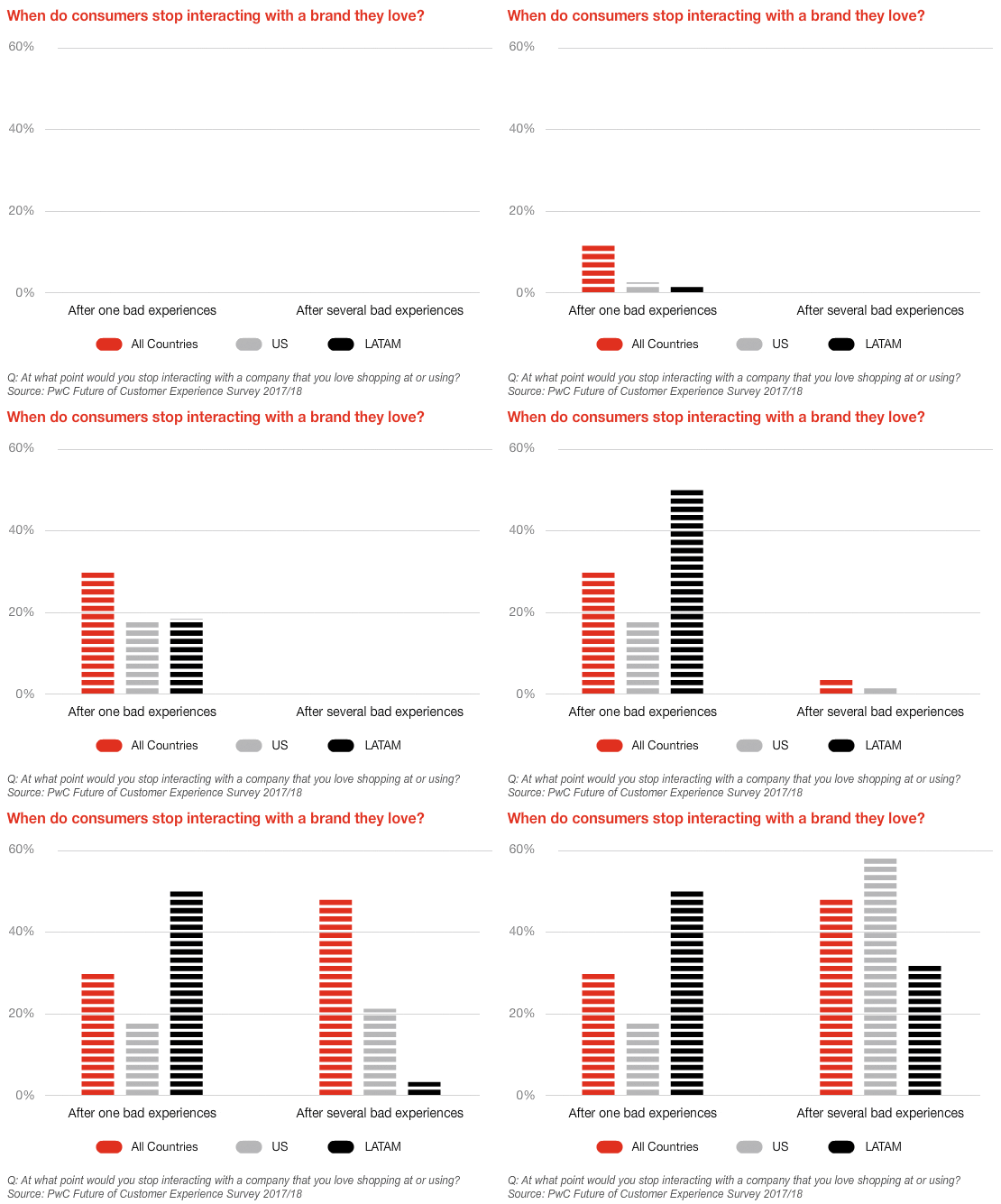
This matters even more in healthcare and wellness platforms, where users expect streamlined, responsive tools that support their daily workflows without unnecessary complexity.
That’s why leading agencies like eSEOspace leverage UX/UI as the foundation for sustainable growth — whether launching new platforms or optimizing established products like TheraPro360.
1. Simplify User Journeys
Every extra step in your software is a potential exit point. Long, cluttered workflows wear users down and reduce their chance of reaching the value your platform offers.
Mapping the complete journey — from first login to task completion — helps teams remove unnecessary screens, clicks, and form fields.
Other high-impact improvements include:
- Auto-populating known fields to reduce manual entry
- Deferring non-essential questions until after core tasks are completed
- Using progress indicators to show users how close they are to completion
“Every extra click is a silent question: ‘Do you still want to be here?’ The more streamlined the journey, the faster users reach value — often without realizing how intentional the flow really is.”
When interfaces guide users intuitively toward success, abandonment rates drop, while satisfaction and retention improve.
2. Design Responsive Interfaces
Responsive design is more than a technical requirement. It’s a loyalty multiplier.
Today’s users switch between mobile, tablet, and desktop, and they expect a consistent experience on every device.
Responsive interfaces that adapt fluidly to screen size create confidence, ease of use, and brand trust. Platforms that feel “native” across all devices consistently outperform those that don’t.
Key strategies include:
- Prioritizing mobile-first layouts with essential functions front and center
- Using fluid grid systems that adjust automatically
- Designing touch-friendly elements (larger buttons, more spacing)
- Enabling hover features and keyboard shortcuts for desktop power users
3. Prioritize Accessibility
Accessibility should go beyond just compliance. It should be about expanding your audience and improving usability for everyone.
Roughly 20% of U.S. users live with some form of disability, and many others operate in environments (low light, limited bandwidth, screen readers) that require flexible design.
Accessibility-forward design includes:
- Ensuring keyboard navigability
- Using high-contrast colors and readable fonts
- Providing clear labels for screen readers
- Testing with assistive tech like voice control and magnifiers
Ask your team:
- Have we audited our design against WCAG accessibility standards?
- Have we tested with real users using assistive devices?
- Are we measuring behavior differences across user types?
Inclusive design isn't just ethically right. It also opens up your product to millions of potential users while reducing legal and reputational risk.
4. Iterate Using Behavioral Data
You can’t fix what you can’t see. While qualitative feedback is helpful, behavioral analytics gives teams hard evidence about where users hesitate, abandon, or struggle.
Tools like heatmaps, session replays, and funnel tracking uncover micro-frictions that often go unnoticed, but can have an outsized impact on retention.
Make sure your team monitors the following:
- Click heatmaps: Identify which elements attract or repel engagement
- Time-on-task: Find slowdowns and cognitive bottlenecks
- Form abandonment: Learn where users quit during entry
- Error logs: Surface hidden usability bugs
- Scroll depth: Understand what content users actually see
How TheraPro360 Leveled Up Its UX
eSEOspace put these four practices into action with TheraPro360, a powerful therapy practice management platform designed for clinicians.
With eSEOspace’s Marketing Consultant and Partner, Irina Shvaya, leading UX strategy and brand positioning, the eSEOspace team collaborated closely with TheraPro360’s leadership to align product flow with user behavior.
Already known for its deep functionality — including scheduling, documentation, and billing — TheraPro360 partnered with the agency to further optimize the user experience and ensure smooth adoption as the platform scaled.
By combining therapist feedback, usage data, and UX best practices, the two teams collaboratively identified areas where small design shifts could lead to meaningful results:
- Streamlined intake and onboarding flows, reducing steps and improving first-time user success
- Simplified dashboard layout and clearer visual hierarchy, making critical tools easier to find
- Improved navigation structure, surfacing the most-used features while minimizing screen clutter
TheraPro360’s updated interface received overwhelmingly positive feedback from users, citing faster task completion, cleaner design, and improved usability across devices.
-content-large-webp.webp)
Internal metrics showed:
- 22% decrease in task abandonment
- Higher session duration and user retention
- A noticeable drop in support requests for navigation-related issues
This project showcases how smart UX improvements — guided by data, collaboration, and design thinking — can strengthen a platform’s market position and deliver a better experience for both clinicians and administrators.
Make Trust and Usability Your Competitive Edge
Clunky software doesn’t just cause frustration. It quietly erodes user trust, team efficiency, and brand value.
Whether you're building healthcare software, SaaS platforms, or internal tools, UX/UI isn't just a design task — it’s a business strategy.
Companies like TheraPro360 that treat usability as a core pillar of product development see stronger adoption, more loyal users, and a higher return on their software investment.
The takeaway?
People won’t remember your codebase, but they’ll remember whether your software made things easier or harder.