
A page can load in Chrome and still lose SEO value before Google finishes indexing it.
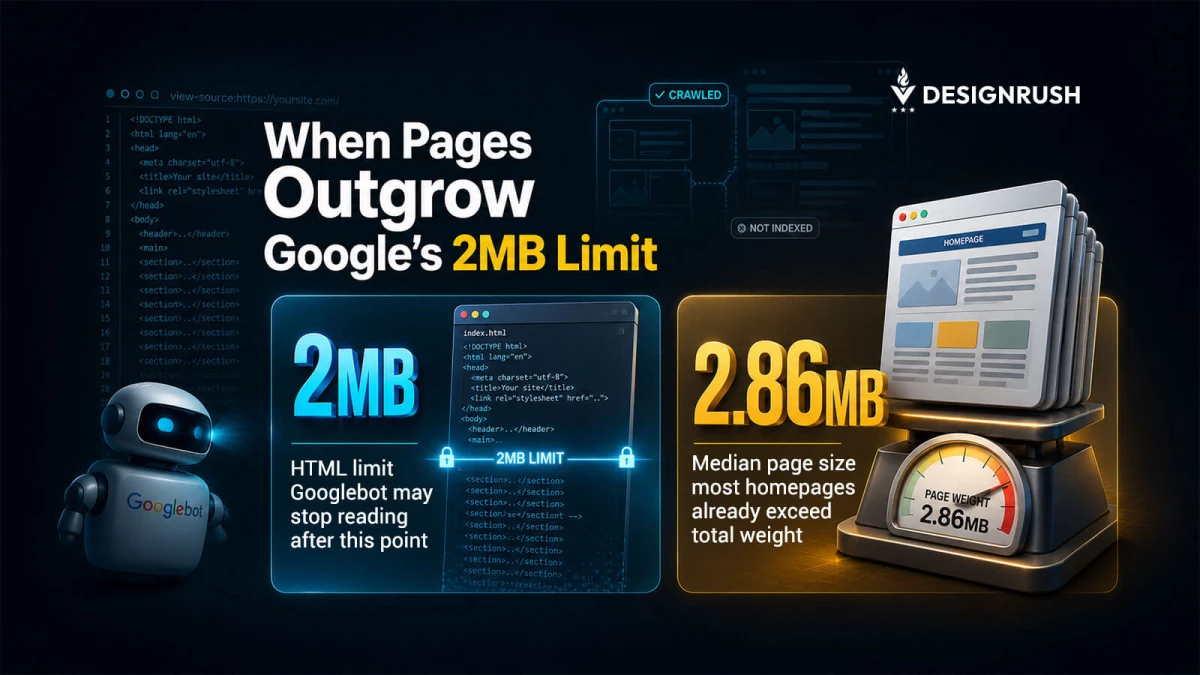
In March 2026, the tech giant confirmed that Googlebot only fetches the first 2MB of supported file types for indexing. Anything after that point gets dropped unless it’s in external files.
If it sits too low in the source, Google may never index it.
“The browser may load the page, but Google may not see the whole thing. That’s the kind of detail websites love to miss until rankings get awkward,” says Adam Heitzman, Manager Partner at HigherVisibility.
The U.S.-based SEO agency has advised hundreds of companies, from small businesses to Fortune 1000s, on search performance and algorithm changes.
“The important part is that this isn’t just a speed issue,” Heitzman adds.
Google’s documentation says the crawler stops fetching once the cutoff is reached and only sends the already downloaded portion for indexing consideration.
So if the page source is bloated, the content that matters is still there for users…but not for search.
What Causes HTML Bloat and Indexing Issues in Google Search
Most websites sit right on the edge of that limit.
HTTP Archive’s 2025 Web Almanac found median home page sizes of 2.86 MB on desktop and 2.56 MB on mobile, while HTML stayed far smaller at about 22 KB on average for desktop home pages.
So, HTML is small enough to stay safe, but that template bloat, inline code, and oversized page structure can push a page toward trouble fast.
The pages most likely to cause problems are the ones stuffed with:
- Repeated navigation
- Oversized headers
- Inline CSS and JavaScript
- Base64 assets
- Layered modules
Google called out those exact problems in its March 2026 guidance, and advised keeping HTML clean, moving heavy CSS and JavaScript into external files, and placing key elements like title tags, canonicals, and structured data higher in the document.
Why? Because source order now affects what Googlebot indexes.
“Now, the question isn’t ‘Does this page load fast enough?’ No. The better question is, ‘Does the important stuff appear before the crawler runs out of source?’” Heitzman says.
“If the answer is no, then the page is only doing half the job for users and less than half for search itself.”
Google’s guidance also makes one more point worth taking seriously: not every file type is treated the same.
PDFs have a much larger fetch limit, but HTML and other supported file types are capped at 2MB. Referenced CSS and JavaScript are fetched separately, each with its own limits.
How To Check if HTML Size Is Blocking Google Indexing
The easiest check is in Chrome.
Open DevTools, go to the Network tab, reload the page, then click the main document request and look at the ‘Size’ column.
That number reflects the uncompressed HTML size, and this is what matters for Googlebot’s fetch limit. Under roughly 2,048 KB is generally safer.
Over that line, assume that Google isn’t seeing it.
- From there, put the title tag, meta robots directives, canonicals, and essential structured data as high in the source as possible.
- Keep large navigation blocks from swallowing the top of the document. Move CSS and JavaScript out of the HTML when they don’t need to be inline.
- Reduce repeated modules that add volume without adding meaning.
It’s also worth checking templates and not just individual pages.
“Home pages tend to carry the heaviest navigation and the most page furniture, so they are often the first to drift into risky territory,” Heitzman says.
Inner pages can do it too when a CMS starts stacking modules, tracking code, and content blocks that no one checks.
HTTP Archive’s data shows that page weight is already substantial across the web, so the problem is routine enough to become a habit.
“A useful rule of thumb is to think in layers,” Heitzman adds.
- The top of the HTML should hold the signals that help Google understand the page.
- The middle should carry the actual content.
- The bottom should be the place for everything else that does not need to be there early.
“When that order gets reversed, search visibility gets harder to trust,” he adds.
A page can still look polished and still fail at the one job search engines need it to do. That’s an expensive mistake.
Google’s 2MB limit turns page weight into an indexing issue, not just a performance issue.
SEO teams should audit source size, clean up templates, move heavy assets out of HTML, and ensure that crucial content sits early enough to be fetched.
If the important text or schema ends up past the cutoff, it does not matter how good it looks to the user.
Google never reached it.