
AI Agents in Enterprise UX: Key Findings
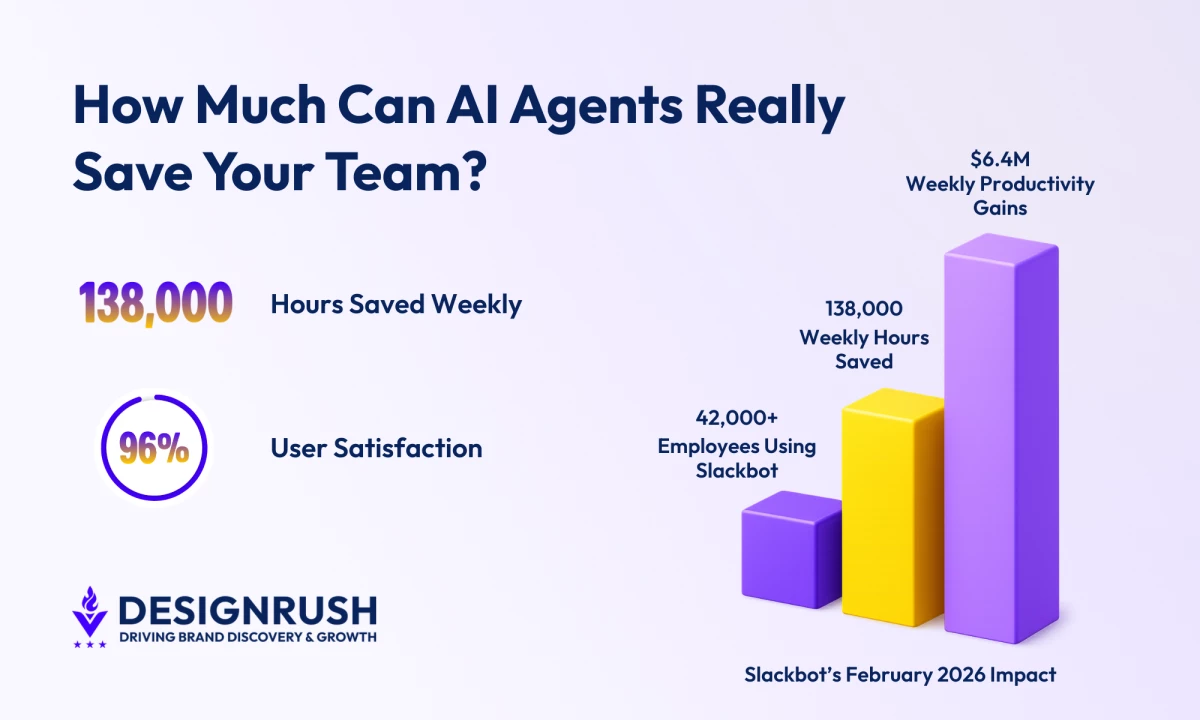
- Slack reports 42,000 employees are saving 138,000 hours weekly, equating to $6.4M in productivity gains, demonstrating the impact of embedded AI agents.
- Slackbot’s 96% satisfaction rate, the highest in Salesforce history, shows that trust and integration fuel adoption.
- Salesforce frames Slackbot as a “super agent” across tools and datasets, underscoring the need for strong UX architecture and data alignment.
Slackbot is saving Salesforce employees 138,000 hours every week.
Since its launch in early 2026, more than 42,000 employees have been using it internally, producing about $6.4 million in weekly productivity gains.
User satisfaction is through the roof at 96%, the highest rating ever recorded in Salesforce history.
For years, Slack handled reminders and basic responses.
But with the 2026 rollout of Slackbot, the system now reads conversations, scans shared files, interprets permissions, and generates responses grounded in live workspace data.
Salesforce refers to these systems as “super agents,” describing something more powerful than a simple bot that answers prompts.
Instead, a super agent operates across tools, datasets, and tasks inside the same environment where work already takes place.
But it also poses a design problem for enterprise products.
To understand what that means in practice, we spoke with Isadora Agency, which works with enterprise brands on web and product design.
The agency’s president, Isadora Marlow‑Morgan, provides insight about how organizations should approach structuring UX systems around AI agents.
She outlined three main priorities:
- Making AI behavior visible inside the interface
- Building in meaningful user oversight
- Designing workflow architecture that supports coordination without introducing new risk
Here’s how enterprise teams can apply those principles.
Editor's Note: This is a sponsored article created in partnership with Isadora Agency.
Making AI Work Predictably in Enterprise UX
Before, digital interfaces were organized around navigation, pages structured with information, and menus guided users.
But AI agents don’t follow that same pattern, as they pull context from collaboration tools, internal documents, analytics platforms, and customer records.
That behavior raises architectural questions:
- Where does the agent appear inside the product?
- How does the interface show which data sources were accessed?
- How does the system expose reasoning without crowding the UI?
- How can users correct it when the intent is misunderstood?
- How are permissions enforced across connected platforms?
- How are agent-initiated actions recorded?
Cornell University research on human and AI collaboration shows that people trust AI more when they can see how it makes decisions and step in when needed.
Systems that provide this visibility face fewer adoption barriers.
In enterprise settings, oversight can’t be skipped because decisions affect revenue, risk, and compliance.
AI that acts without transparency creates uncertainty.
But AI that shows its reasoning inside workflows builds trust.
So, UX design teams should focus on making that reasoning visible and understandable.
AI Governance Now Lives Inside the Interface
Isadora Agency designs enterprise platforms, digital products, and complex UX systems where decision logic and data orchestration matter as much as visual design.
Its work with global brands involves structuring complex data flows so that intelligence, whether human or machine-assisted, behaves predictably inside the experience.
“AI agents are quickly becoming part of how work actually gets done. UX has to treat them as active participants in the workflow, not just tools sitting on the side.”
“Interfaces need to show what the agent accessed, how it reached a conclusion, and where users can step in,” Marlow‑Morgan says.
Too often, organizations introduce AI into systems that weren’t designed to support it, layering it on instead of building around it.
The agency’s approach starts with one idea. AI agents are part of the workflow and need to be designed into the system instead of being added on later.
Isadora Agency keeps it practical by designing interfaces that make AI’s behavior clear.
Complex coordination works when the interface shows what the agent is doing.
- Information architecture must span systems, not pages
- Content strategy should blend machine and human output
- Interaction models must signal when agents act and allow user control
- Governance must make automated decisions visible and accountable
Designing for AI agents starts with the structure that makes them work reliably and predictably.
“If design leaves those questions unanswered, the technology will feel unpredictable, and people will avoid it,” Marlow‑Morgan says.
Isadora Agency’s in-progress work on Zari shows how AI-led product thinking can shape social coordination from the ground up, with a focus on clarity, usability, and real-world interaction rather than layered complexity:
That type of work begins early in the product lifecycle.
Teams map workflows from start to finish before introducing automation.
Data models across departments stay aligned so the agent reads a single, consistent set of information.
And clear control points show where users can guide, correct, or stop the agent.
Leaders often focus on productivity outcomes, hours saved, and automated tasks that attract attention.
A deeper question is whether the organization’s architecture can support AI coordinating across tools and systems without creating confusion.
All of this planning matters because AI coordination is now happening across collaboration platforms, CRM systems, analytics suites, and internal knowledge bases.
Agents summarize conversations, draft briefings, pull records, and suggest next steps inside the same interface.
Slackbot’s 2026 relaunch shows what this looks like in practice.
It works inside the platform, reads conversations and files, and presents answers where work actually happens.
Workflow Architecture Is the AI Advantage for Enterprises
This example shows how AI participation can be visible and predictable.
UX teams decide how agents act, how their reasoning appears, and how users can adjust or stop actions.
The system must let automation help make decisions without taking control away.
It’s the kind of structural work that supports AI at scale.
AI agents that work across multiple tools and handle different tasks are already part of enterprise systems.
Organizations that treat UX architecture as the base for AI coordination handle these agents more effectively.
The technology will keep improving.
And as this becomes standard practice across enterprise systems, the competitive stakes rise.
Platforms are embedding AI directly into daily workflows, making agents part of the core product experience instead of a feature layered on top.
“Productivity gains get attention,” Marlow-Morgan says.
“But long-term adoption depends on whether the system is predictable, transparent, and governed from the start. If users don’t understand how an agent reached a decision, they won’t trust it.”