
WP Engine has launched Commerce Connect for BigCommerce, giving WordPress stores a way to add BigCommerce’s commerce capabilities without rebuilding the content, design, URL structure, or SEO foundation already in place.
The service is aimed at high-growth, mid-market brands whose commerce needs are becoming harder to manage.
For WordPress brands starting to hit those limits, Commerce Connect offers a way to change the commerce layer without rebuilding the rest of the site.
As one of the top web agencies, Lounge Lizard sees that tradeoff regularly in its WordPress and eCommerce work.
The agency’s Co-Founder and Chief Brandtender, Ken Braun, says growth alone isn’t a reason to rebuild an entire site.
“If the website is still doing its job and the commerce side is struggling to keep up, I wouldn’t start by replacing everything just yet,” Braun says.
“I’d figure out what’s actually causing the problem first.”
Commerce Connect Preserves WordPress SEO and Design
Commerce Connect keeps the existing WordPress experience in place while BigCommerce handles the commerce layer behind it.
BigCommerce for WordPress connects the two platforms through APIs, pulling product data into WordPress while order data stays on BigCommerce servers and most store settings are managed there.
That lets brands retain their existing themes, custom designs, URL structures, content, and SEO foundation.
WP Engine also says stores can remain operational while the commerce layer is upgraded, avoiding the need to take the customer-facing experience offline.
“Changing the CMS, URLs, design, checkout, and backend at the same time gives you a lot more to watch,” Braun adds.
“If there’s no reason to disturb the content experience, keeping that stable can make the move much easier to manage.”
When WordPress Stores Outgrow Their eCommerce Platform
WP Engine is positioning Commerce Connect for brands that have already invested in WordPress hosting but are starting to deal with larger catalogs, higher traffic, and more complicated commerce operations.
For stores reaching those limits, BigCommerce for WordPress supports complex product catalogs, multisite and multichannel selling, shipping tools, and integrations with enterprise systems.
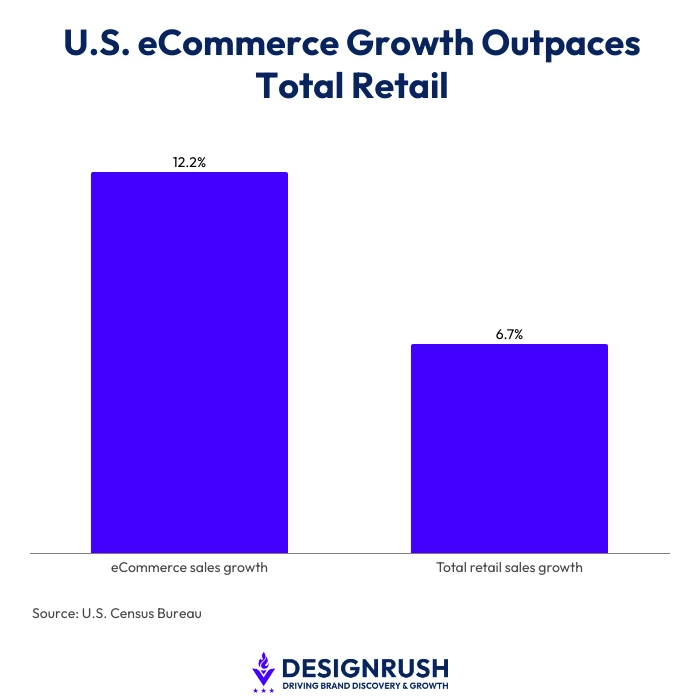
Those demands are growing alongside the eCommerce market itself, with the U.S. Census Bureau finding that U.S. eCommerce sales rose 12.2% year over year in the second quarter of 2026, compared with 6.7% growth across total retail sales.
“If your team keeps running into catalog, checkout, fulfillment, or integration limits, that’s useful information,” Braun says.
“You need to know whether the problem is the customer-facing site or the machinery behind it before you commit to a rebuild.”
What to Check Before a WordPress eCommerce Migration
Before moving to BigCommerce, teams need to compare the new setup with the store they already operate, including payment methods, shipping, analytics, product data, customer accounts, integrations, and any custom features the business relies on.
Checkout deserves particular attention, especially as Baymard Institute found that 17% of U.S. online shoppers had abandoned an order because the checkout process was too long or complicated.
BigCommerce’s WordPress documentation also lists several functions that are not currently supported, including persistent carts, cart preview, cart-page promotional banners, real-time catalog syncing, and Google Analytics Enhanced eCommerce.
Catalog size and update frequency can affect migration performance as well. BigCommerce says import times vary with network latency, system load, product volume, and how often catalog data changes.
Teams also need to decide who owns the setup after launch. Integrations require testing, plugins need updates, and custom connections still need someone responsible for them.
“The best setup is one the business can actually live with after launch,” Braun concludes.
“If it gives you more room to grow but makes every routine change harder for the team, you’ve created a different problem.”
Before approving a migration, leaders should weigh the extra capacity against what the new setup will demand from the team day to day.
So ask yourself this.
If your current commerce platform is already limiting growth, could a migration remove that bottleneck without forcing a full site rebuild?