
Key Takeaways:
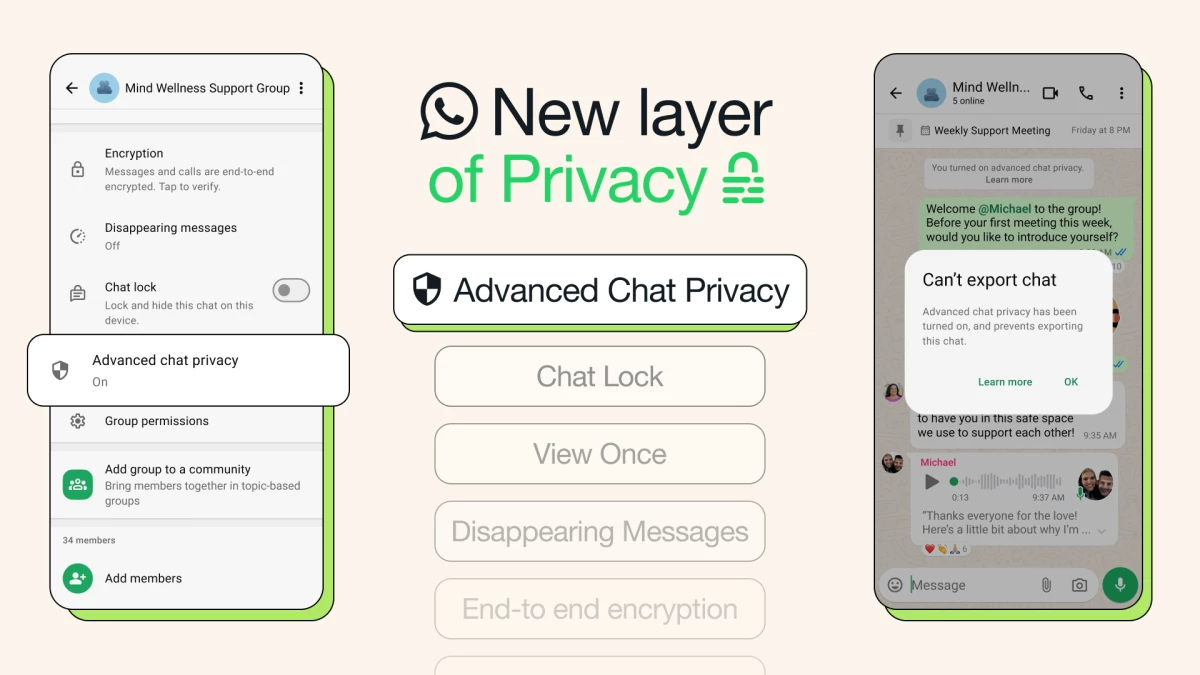
- WhatsApp introduces "Advanced Chat Privacy" to prevent chat exports, media auto-downloads, and Meta AI use in conversations.
- The feature is aimed at making group chats safer for sensitive topics, reinforcing trust and positioning the app as a secure, go-to space for group interactions.
- WhatsApp hints at future privacy upgrades, like screenshot blocking, as part of its expanding suite of chat protections.
WhatsApp is leveling up its privacy game with a new setting called "Advanced Chat Privacy," designed to keep conversations even more contained, especially in group settings.
Rolling out now to users on the latest version of the app, the feature blocks exporting chats, auto-downloading media, and using messages for Meta AI.
This gives everyone in the chat more confidence that what's said stays inside.
add an extra layer of protection to your chats 🔒 advanced chat privacy stops media downloads, block chat exports, and keep your messages between you and who you’re talking to pic.twitter.com/8wmh2OCgQL
— WhatsApp (@WhatsApp) April 23, 2025
While WhatsApp already protects messages with end-to-end encryption, this new layer builds on that foundation with extra privacy controls.
Users can activate the setting by tapping the chat or group name and enabling Advanced Chat Privacy.
By adding practical, situational privacy tools, WhatsApp reinforces its role as a platform that adapts to real-world user trust.
The brand messaging is clear: more than just encryption, privacy means maintaining a degree of control.
A New Layer for Sensitive Conversations
The feature is especially relevant for situations where participants may not know each other well but are discussing sensitive topics.
Whether it's health issues or community organizing, the ability to prevent content from being exported or used for AI features is essential.
This is just the first version of Advanced Chat Privacy, with more protections expected in future updates.
For now, screenshots are still allowed, but WhatsApp has signaled that additional safeguards may be on the way.
reminder, you always have the option to block unwanted contacts or messages ✋ when you block a contact, you’ll stop receiving calls, messages and Status updates from that person
— WhatsApp (@WhatsApp) April 21, 2025
you can also block high volumes of unknown messages, here’s how:
Settings > Privacy > Advanced >…
Earlier this month, the popular messaging app also launched a host of new features, including:
- "Online" indicator in group chats: To help you know if people are around to chat, you can now see how many people are online in real-time, right under the group name.
- Highlight notifications in groups: Prioritize alerts with the new "Notify for" setting — choose "Highlights" for @mentions, replies, and contacts, or ‘All’ for every message.
- Events updates: Create events in 1:1 chats, RSVP as "maybe," bring a plus one, set end times, and pin events in chat.
- Tappable reactions: See who reacted and tap to add your own, perfect for a quick +1.
- Document scanning on iPhone: Use "Scan document" in the attachment tray to scan, crop, and send files directly from your iPhone.
- Default App for iPhone: Set WhatsApp as your default messaging and calling app via iPhone Settings > Default Apps.
The latest update reflects WhatsApp's focus on practical privacy layers beyond encryption.
From chat lock to disappearing messages, the platform continues to position itself as the messaging app that takes your boundaries seriously.
Last October, the messaging giant joined forces with the Mercedes-AMG Petronas Formula 1 Team for a campaign about racer Lewis Hamilton.