
LinkedIn says it is blocking hundreds of thousands of automated comment attempts every day, along with millions of other automation attempts over the past couple of months, according to TechCrunch.
That enforcement push matters to outreach teams because LinkedIn limits how many connection invitations members can send.
Ask an outreach vendor what LinkedIn's invitation limit is and you will probably get a number. Ask where LinkedIn publishes it and the answer becomes harder to find.
LinkedIn's Help Center confirms that invitation restrictions exist and says they typically clear in about a week.
The gap between what the platform publishes and what the market repeats is where accounts get lost.
Outreach vendors must decide how much activity they will allow before an account reaches that point.
One of them is gtm-api.com, which uses account history and recent activity to set its own limits for outreach teams and AI agents.
Evgenii Salamatov, co-founder of gtm-api.com, says relying on a fixed number can give teams a false sense of how much an account can handle.
"The dangerous number is not the high one. It is the confident one," Salamatov says.
"People run 20 a day because a blog said 100 a week, on an account that was created on Tuesday."
Regardless of the limit a vendor sets, LinkedIn's own rules still apply. Its Help Center states that it doesn't permit third-party software that automates activity, and accounts using prohibited tools can be restricted.
But every tool in this category carries account risk that no vendor can remove.
What a vendor can do is decide how much activity it will allow and publish that limit.
TechLinked examines LinkedIn's crackdown on automated activity and AI-generated content:
LinkedIn Does Not Publish a Connection Request Limit
LinkedIn does publish some boundaries around connection activity, one of which is the network cap.
Members can hold up to 30,000 first-degree connections, and once they reach that ceiling, invitations stop working in both directions.
LinkedIn also describes invitation restrictions. It says they typically last about a week, but it does not publish the number of invitations that triggers one.
Accounts can also be restricted for sending many invitations in a short period, having too many ignored or marked as spam, or sending excessive invitations when automation is suspected.
That leaves the weekly and daily figures commonly used by outreach teams outside LinkedIn's published guidance.
"Anybody quoting a weekly cap is quoting the community, and they should say so," Salamatov says.
Vendy Steinberga reviews the connection-request limits commonly discussed by LinkedIn users and practitioners:
LinkedIn Connection Request Benchmarks Vary by Account
The figures in circulation are roughly 100 invitations a week on free and Premium accounts, and 150 to 200 on Sales Navigator.
Those are community-observed figures. They can still be useful as reference points, but they do not describe every account.
The arithmetic can catch teams out, too.
A daily rate of 15 to 20 invitations sounds conservative until it runs 7 days a week. That works out to 105 to 140 invitations against the roughly 100-a-week community benchmark.
A daily target only makes sense if the number of sending days is stated with it, and that detail is often left out.
Even that calculation assumes the same kind of limit applies across accounts. Salamatov says that gtm-api.com is increasingly seeing that it does not.
"Stop looking for one number. We see 2 groups of accounts now. One is still on LinkedIn's old weekly limit and sends about 150 to 200 connection requests a week. The other is on a newer daily limit that LinkedIn is rolling out gradually," he says.
Salamatov says the newer limit is around 10 invitations a day depending on the account, which can put weekly capacity below 100.
He says that gtm-api.com sees the daily model more often in Europe and the U.S., while accounts in Latin America are more commonly still operating under weekly limits.
These are the company's observations, not limits published by LinkedIn.
That variation also makes a community benchmark a poor starting point for a new account.
"Starting there is like redlining an engine you have not run in," Salamatov says.
How gtm-api.com Calculates LinkedIn Account Warm-Up Limits
The alternative is to compute the allowance from the account itself.
The company publishes its warm-up allowance as a share of the maximum its own model uses for each action.
A brand-new, dormant profile gets about 2%, which on invitations is roughly one a day.
One month of moderate activity takes this to around 22%, or 7 to 8 invitations a day.
An aged account that simply went quiet restarts higher, around 10%, because age counts for something the new account doesn’t have yet.
Where an account starts depends on more than age, with gtm-api.com also factoring in limit hits and blocks in the last 30 days, recent sending activity, session and IP spread, and profile completeness.
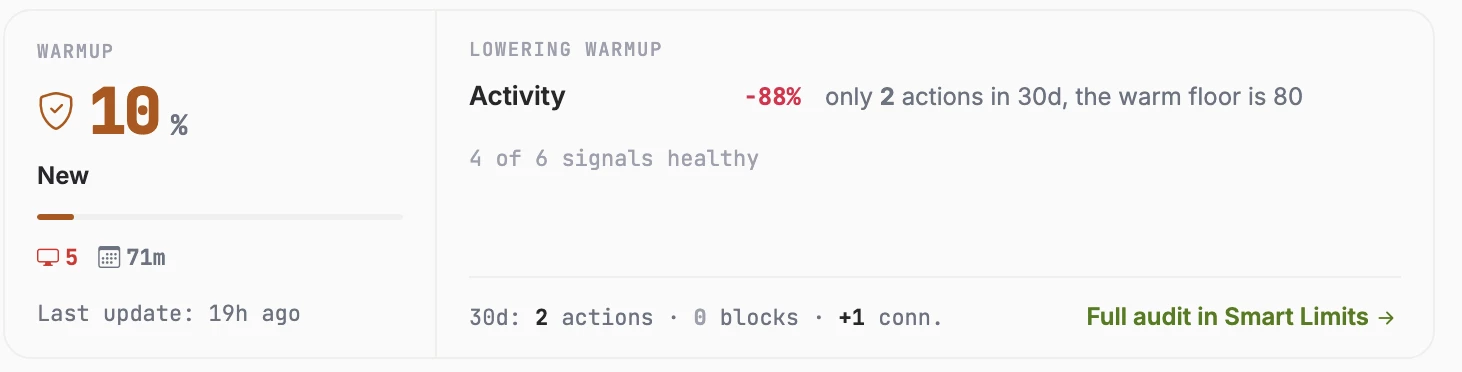
The computed allowance for one account, recalculated from its own history
The score is recalculated as the account's activity changes. That controls how quickly the allowance can rise.
The cap climbs gradually, moving about a fifth of the remaining gap at each recompute, so the account approaches its limit without testing it outright.
A limit hit or block can pull it down immediately.
When an action is refused, the engine pauses invitations for about an hour and the refusal lowers the next recompute.
A failed action does not count against the day's allowance because only successful actions do.
Salamatov says the team watches whether refusals begin to repeat.
"When LinkedIn turns down a connection request because the day's limit is used up, that's the clearest signal you get," he says.
"Once in a while, it's information. Often, it's a pattern, and in our experience that pattern comes before forced logouts, and logouts come before a restriction.
"Capacity is something you discover by walking towards it. And the moment you find it by getting refused, you have already paid for the information."
The gtm-api.com team walks through its per-action limits and Smart Limits system for connected LinkedIn accounts:
Fleet Averages Can Hide LinkedIn Outreach Risk
Those differences are harder to spot when an agency is managing many client accounts at once.
Based on gtm-api.com’s model, 10 limit hits and 2 blocks inside a month can hold an account near 18% of its maximum regardless of age, so an older account can still be the one in trouble.
The fleet total absorbs it without a visible dip, and the account keeps producing just enough to look fine.
Different limit models make the problem harder to spot. Two accounts at the same agency can receive the same daily target even though one has far less room to send.
"Give both a target of 15 a day and the first is barely working while the second is refused by lunch, and the fleet average still looks fine," Salamatov says.
Within each account, gtm-api.com also separates different types of LinkedIn activity. The company assigns 16 per-action budgets, each with its own daily cap, so heavy activity elsewhere cannot use the invitation allowance.
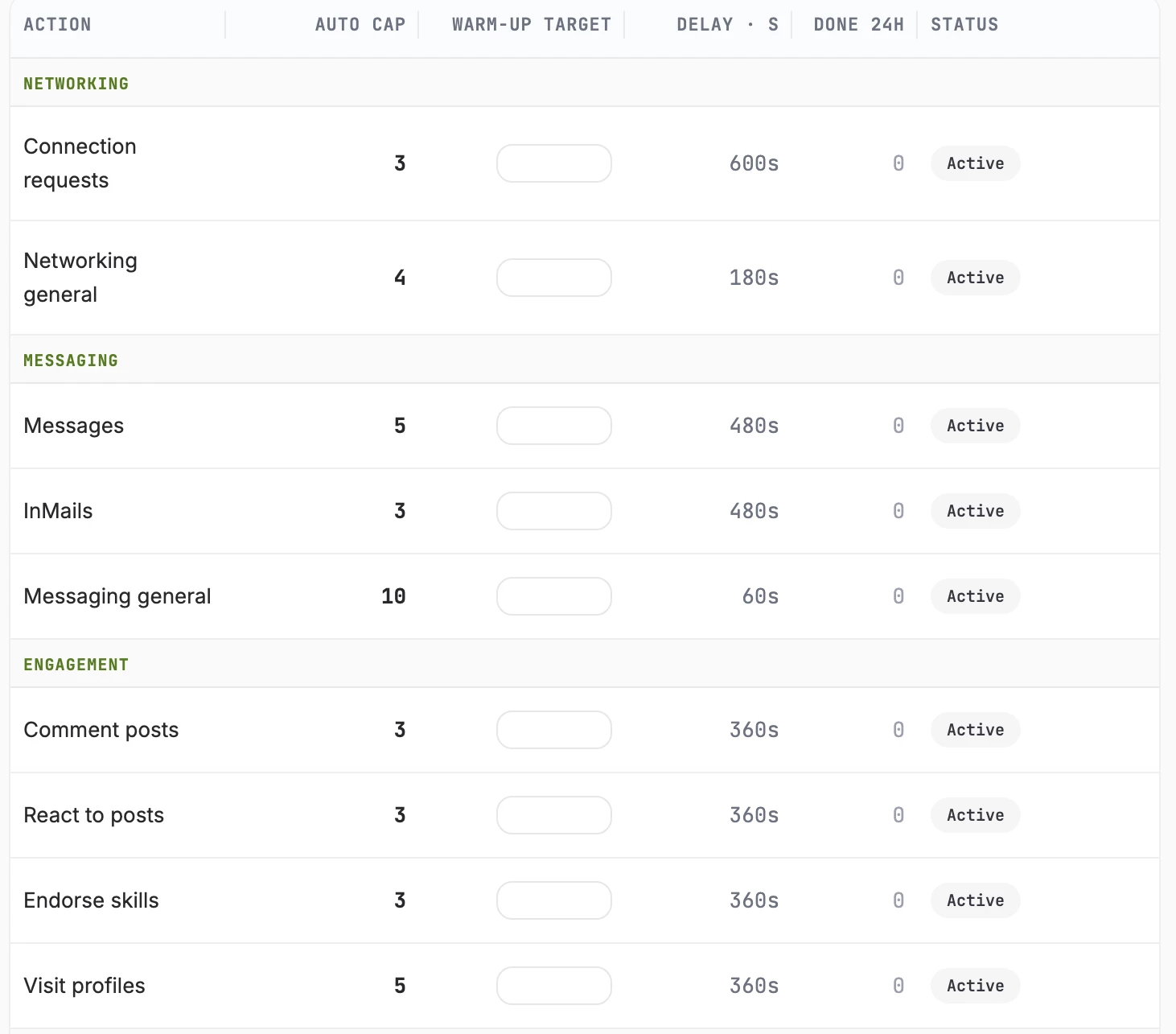
A separate budget per action, written the moment an account connects
Every cap is enforced on the server before the action fires, which means a client's own workflow cannot raise it.
"A limit your integration can override is a suggestion," Salamatov says.
"The whole point is that the account is protected from the person operating it, including us."
How to Set LinkedIn Outreach Limits by Account
Salamatov says the gap between a campaign target and an account's actual capacity often becomes obvious only after a client's founder profile stops working in the middle of a campaign.
By then, the fleet average can still look normal, while a community benchmark says little about why that particular account ran into trouble.
His recommendation is to set capacity at the account level and adjust it as the account's own history changes.
"Our smart limits give every account its own number, based on its own history, and push each one as far as it can go without getting refused," Salamatov says.
"That's why we publish a warm-up curve, not a target."