

Choosing between hiring an agency or handling work internally is challenging.
After all, you can hire an agency and lose control. Additionally, changes can take time and communication could be slow, so you end up relying on someone else's plan.
Or you can build everything internally, control proxies and bots, and scale infrastructure yourself.
Both cost more than they should.
Still, there is also an option fewer teams look into, which is to control logic for scrapers themselves while outsourcing support infrastructure.
What Web Scraping Actually Requires
Getting data from a website requires two things.
First, you need to get the page, which can sometimes be done with a direct HTTP call to the URL.
In other cases, the web page will fetch data with the help of JavaScript. This will make you require a browser that is capable of rendering the web page.
Websites now actively block web scraping by redesigning pages and deploying fingerprinting to detect automated traffic.
They also add CAPTCHAs and anti-bot systems that distinguish real users from bots.
Second, you need a robust infrastructure to deal with this, such as rotating through proxy networks to avoid the banning of IPs and a CAPTCHA-solving solution, while adapting to evolving detection systems.
Most engineers focus on visible parts; if a product page redesigns, parsing code breaks and your team can fix it.
But dealing with proxy logic and adaptation of bot detection systems is an invisible layer that requires continual updates and use of external services.
The Real Decision: Who Controls What?
Having code that you write gives you full control over scraper logic.
You own the code for parsing, interaction steps and data definition, but what you don’t own and is a source of headaches, is infrastructure.
Managing proxies, evading bot detection, scaling browsers and keeping up with site changes are all responsibilities that land on your team.
Demand for this data is growing: 86% of surveyed U.S. enterprise leaders expect their AI infrastructure budgets to increase over the next three years, according to Deloitte's 2026 research.
Scraper logic has to be adjusted frequently when your data needs a change. Your engineers end up maintaining scrapers instead of shipping product.
Alternatively, a managed service can take care of everything for you. You tell them what data you need, and they build and maintain the data collector.
But if you need to change something, such as adding a new field or adjusting logic or targeting new sites, you must wait for their schedule.
A common option missed by teams is to own the scraper code and rent the infrastructure. You write the code, Auto Self-Healing keeps it working as sites change, and a platform manages proxies, unblocking, browser automation and hosting.
Splitting it this way is faster than waiting on a vendor or maintaining it all yourself. Scraper Studio by Bright Data is built this way. You define and control code, and the platform takes care of the rest.
How Bright Data Scraper Studio Works
Define the data you want, build the scraper with AI or code, and launch it to get structured web data.
Option 1: AI Agent Mode
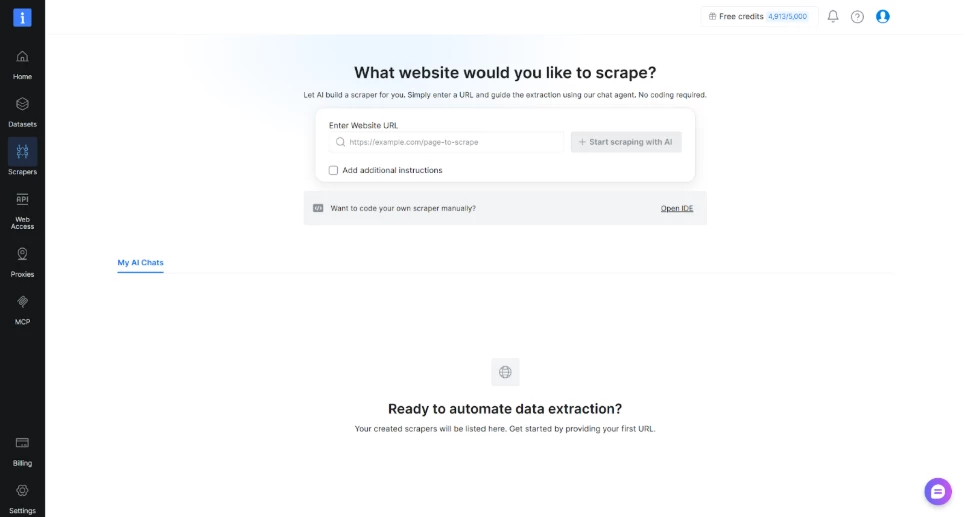
Then, describe your requirements and provide a URL to Scraper Studio's Agent as follows:
"Gather name, price, and availability from the product on the following URL: <URL>."
The next step is to clarify potential details and let the agent build an output schema.
Once approved, it codes the scraper in minutes, depending on complexity.
Option 2: IDE Mode
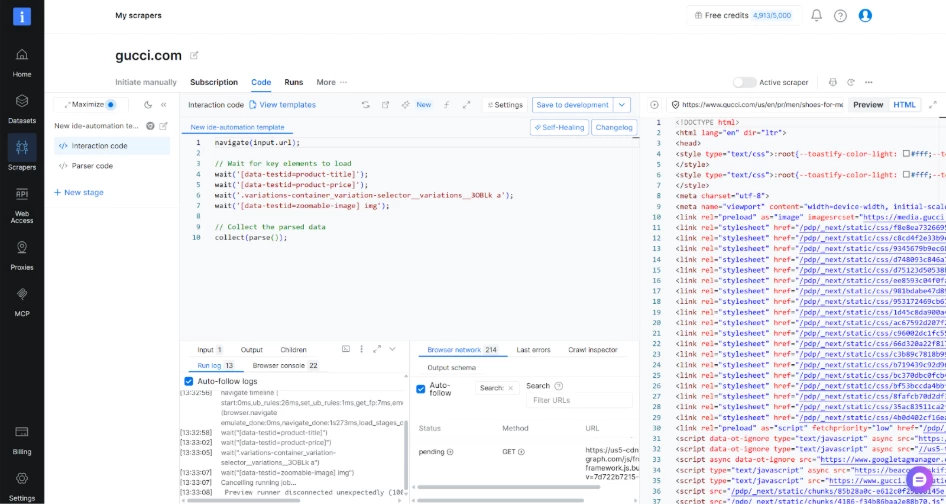
Write code yourself directly in a browser-based editor. Control every interaction step and parsing logic.
You can also open code from the AI Agent in the IDE: start with AI, then refine by hand.
In either case you always keep control over code used for scrapers.
Prefer to work in your terminal? Build scrapers through Claude Code, Cursor or Codex with the Bright Data CLI. Paste a prompt with the target URL and the fields you want. The agent builds the scraper, runs it and returns structured JSON. Nothing is installed globally, because the CLI runs on demand through npx.
Testing and Delivery
Run the scraper right away or schedule it daily, weekly or monthly.
Test one URL first and then use batch jobs sending hundreds of rows. Get results as JSON, CSV, XLSX or NDJSON, delivered to an API, webhook, cloud storage or Snowflake.
When Sites Change
Websites change their layouts constantly, and every change can break your parsing. Scraper Studio handles this in two ways.
Auto Self-Healing watches each scraper’s runs. When the success rate falls below a threshold you set, or a parsing or navigation error appears, it starts a repair on its own. Healing jobs cost no credits.
You decide how much control to keep. Leave auto-save off and your team gets an email to review the fix before it goes live. Turn it on and fixes go straight to production. Cooldowns and a daily cap keep repairs in check.
Self-Healing covers on-demand fixes. Describe what changed, for example “Prices now appear in a div with class price-tag,” and AI refactors the code. You review the diff and approve it before deploying.
Either way, the broken selector gets fixed before anyone notices the data has stopped.
When Each Approach Actually Makes Sense
The question is simple: how often do you change code?
- Monthly or more? Go for the in-house route: waiting for an agency to fit you into their sprint cycle wastes time. Scraper Studio lets you manage changes at your own pace, and Auto Self-Healing repairs common breaks like parsing and navigation errors, so your team only touches code when the data you need changes.
- Once a year or less? Managed agencies make more sense: lower total costs and no engineering needed; vendor takes care of everything for you.
- Targeting popular sites? Check out Bright Data’s Scrapers Library first: why reinvent the wheel if a solution already exists?
What You Actually Need
For AI Agent mode, you provide a target URL and the data you want. That's all.
In case of IDE mode, you write JavaScript code. You don't need to set up browser automation or proxy rotation.
Just code the logic for what to do on the page and what to scrape.
In both cases, you don't set up infrastructure, configure proxies or debug retry logic.
The Real Difference
Your team decides what matters: which sites to target, which fields to extract and how the data should look. You own the scraper code, whether AI writes it or you do.
Bright Data handles the parts that change constantly and that no team wants to own: proxies, unblocking and anti-bot systems, browsers and scaling.
When sites change, Auto Self-Healing repairs the scraper, and you decide whether to review the fix first.
You get the control of building in-house without the infrastructure work, and you don’t have to wait on an agency.
That's the Bright Data Scraper Studio approach.