
Mobile Optimization for eCommerce: Key Findings
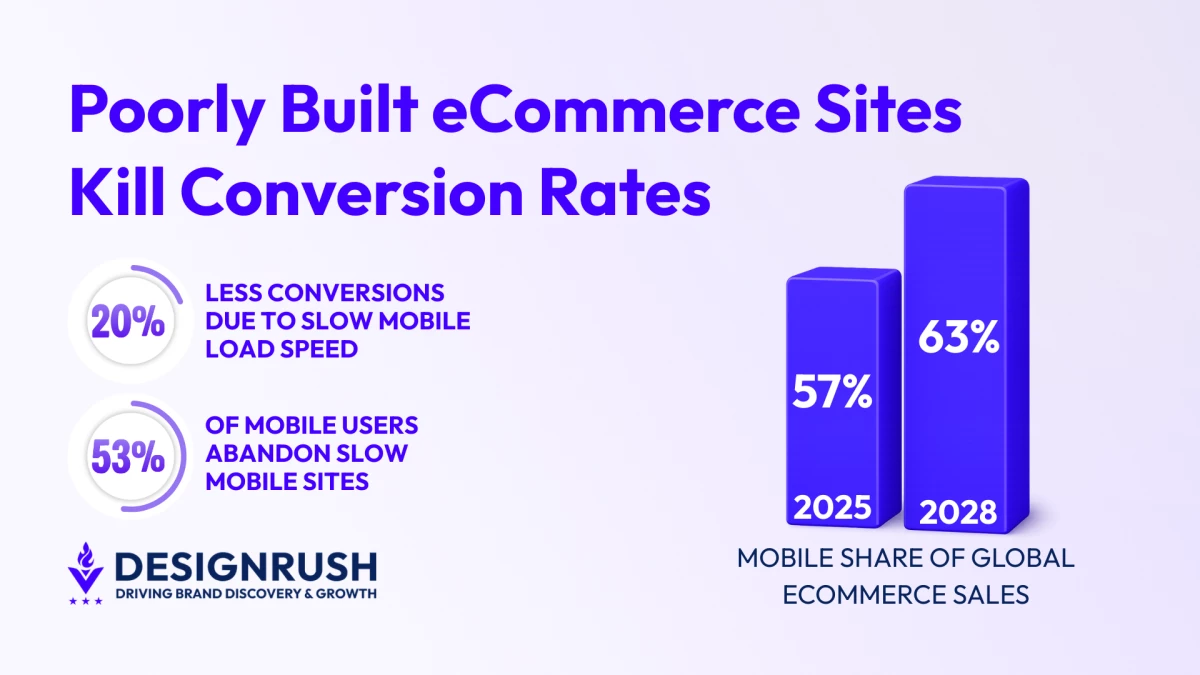
- 53% of mobile users abandon sites that take longer than three seconds to load, making performance a primary acquisition and retention issue.
- Mobile will account for 63% of all eCommerce sales by 2028, turning mobile speed into a core growth lever.
- Infrastructure-level optimization protects margin and ad efficiency, ensuring performance scales with traffic instead of collapsing under it.
In the grand scheme of things, a second doesn’t feel like much.
But when it comes to revenue, it definitely matters.
New performance data from Elementor shows that even a one-second delay in mobile page load time can reduce conversion rate by up to 20%.
In fact, more than half of mobile users abandon sites that take longer than three seconds to load.
These stats matter because mobile has become the primary platform for eCommerce.
Data from Capital One Shopping Research reveals that 57% of global eCommerce sales come from mobile devices. This number is projected to rise to 63% by 2028.
All of these figures prove that speed is not a design preference or a fancy SEO metric. It directly impacts conversion rates, paid ad efficiency, organic visibility, and acquisition costs.
Yet, some eCommerce brands still treat it like an afterthought, resorting to image compression or swapping out a plugin for a new one.
This is a common problem Caleb Bradley, CEO of leading enterprise eCommerce agency Bighorn Web Solutions, encounters when brands come to him for help.
“Surface fixes can improve a speed score, but they rarely solve the real issue since eCommerce performance problems are often architectural in nature,” Bradley said.
“Backend decisions about hosting, caching, integrations, and data flow quietly compound milliseconds across every interaction. That’s where revenue leakage begins.”
Where eCommerce Performance Breaks Down
In an overwhelming majority of cases, slow performance is never caused by a single point of failure.
It happens through a series of backend decisions that create bottlenecks across the entire eCommerce site:
- Overloaded themes and third-party scripts: Frontend templates often carry logic that should run server-side. Each additional script introduces execution time and dependency chains that delay rendering.
- Weak or missing caching: Without proper server and application-level caching, the system rebuilds content repeatedly instead of serving optimized versions.
- Inefficient database queries and excessive API calls: Every product view can trigger pricing rules, inventory checks, personalization engines, and recommendation queries. Multiply that by thousands of sessions, and the delay compounds.
- ERP and middleware bottlenecks: Legacy integrations can slow dynamic requests, particularly when systems were not designed for real-time eCommerce traffic.
- Hosting misalignment: Environments optimized for static sites struggle under dynamic commerce workloads, especially during traffic surges.
Audit Where Revenue Is Actually Lost
Whenever brands suspect site performance is slowing down, they typically audit their websites to find out what’s wrong.
Audits are the right move. But the pages that undergo that audit are critical in uncovering the problem.
“Synthetic tests tell part of the story, but real user performance data reveals where actual friction occurs,” Bradley explained.
“The goal is to isolate what’s slowing down revenue-generating pages specifically on PDPs, cart, and checkout. Auditing just the homepage isn’t enough.”
That advice is sound. After all, revenue rarely happens on a homepage.
Shoppers leave product detail pages, abandon carts, or drop off during checkout.
As such, these moments should be scrutinized at a structural level.
If you suspect that your eCommerce site is suffering from performance issues, Bighorn Web Solutions recommends auditing beyond surface metrics and examining backend drivers like:
- Time to First Byte (server response time)
- API call volume per page
- Third-party script execution time
- Largest Contentful Paint and Total Blocking Time
- Database query efficiency
- Hosting performance under peak load
“Infrastructure-level optimization ensures performance scales with traffic. It protects marketing efficiency and preserves margin,” Bradley said.
“Speed is a very real revenue lever. And in eCommerce, milliseconds are often the difference between growth and stagnation.”
Fix Performance at the Architectural Level
When performance problems stem from infrastructure, surface-level tweaks only delay the next dip in performance.
Once revenue leakage is identified through an audit, teams now face important questions.
Which parts of the experience truly deserve priority? Do we really need all of these elements that have accumulated over time?
The approach here is two-fold, starting with frontend fixes for a more disciplined mobile-first approach:
- Defer non-critical JavaScript. When everything loads at once, nothing loads quickly. Delaying secondary scripts protects the first meaningful interaction and reduces early abandonment.
- Use lazy-load images and below-the-fold assets. Customers should not wait for content they have not yet requested. Smaller initial payloads reduce perceived delay and protect engagement.
- Load personalization and tracking after core content. Measurement is valuable, but not at the expense of visibility. Core product content must render before analytics layers compete for resources.
- Eliminate redundant applications performing similar functions. Overlapping tools increase API calls and execution time, compounding performance cost across every session.
Of course, frontend fixes are only half the equation.
True performance stability is determined at the backend, where database queries, caching logic, hosting configuration, and system integrations either reinforce site speed or erode it.
After all, when backend systems are inefficient, frontend optimizations merely conceal the symptoms.
Ask your team to prioritize these key backend optimizations:
- Implement edge caching through a CDN. Serving content closer to users reduces latency variability and stabilizes performance during traffic spikes.
- Optimize database queries and reduce unnecessary API calls. Dynamic eCommerce relies on constant data retrieval. Inefficient queries multiply under load and slow every product interaction.
- Improve Time to First Byte through smarter hosting configuration. The initial server response sets the pace for everything that follows. Faster acknowledgment improves overall rendering flow.
- Enable object caching where possible. Frequently accessed data should be stored intelligently rather than regenerated repeatedly, preserving server resources and consistency.
Optimize Architecture for Strategic Growth
Incremental tweaks may improve speed scores, but inefficient infrastructure compounds technical debt over time.
As systems grow more complex, delays increase, and the cost of inaction rises.
Infrastructure-level optimization, by contrast, allows performance to scale with demand, while creating the kind of positive user experience that builds brand loyalty.
After all, customer loyalty is built in the seconds when nothing goes wrong.