
Optimizing UX for AI and Humans: Key Points
- Google’s new AI image search makes visuals core to discovery, pushing B2B brands to treat design as a search asset, not decoration.
- Use clear visuals, semantic tags, and descriptive metadata so AI and users instantly understand the purpose.
- Simplify hierarchy with contrast, spacing, and contextual imagery to help both people and algorithms find value faster.
Google recently released an update for AI Mode, which made it easier for users to conduct image searches, even when using vague descriptions.
This allows users to take a much more conversational tone while searching, as well as refine their searches step by step.
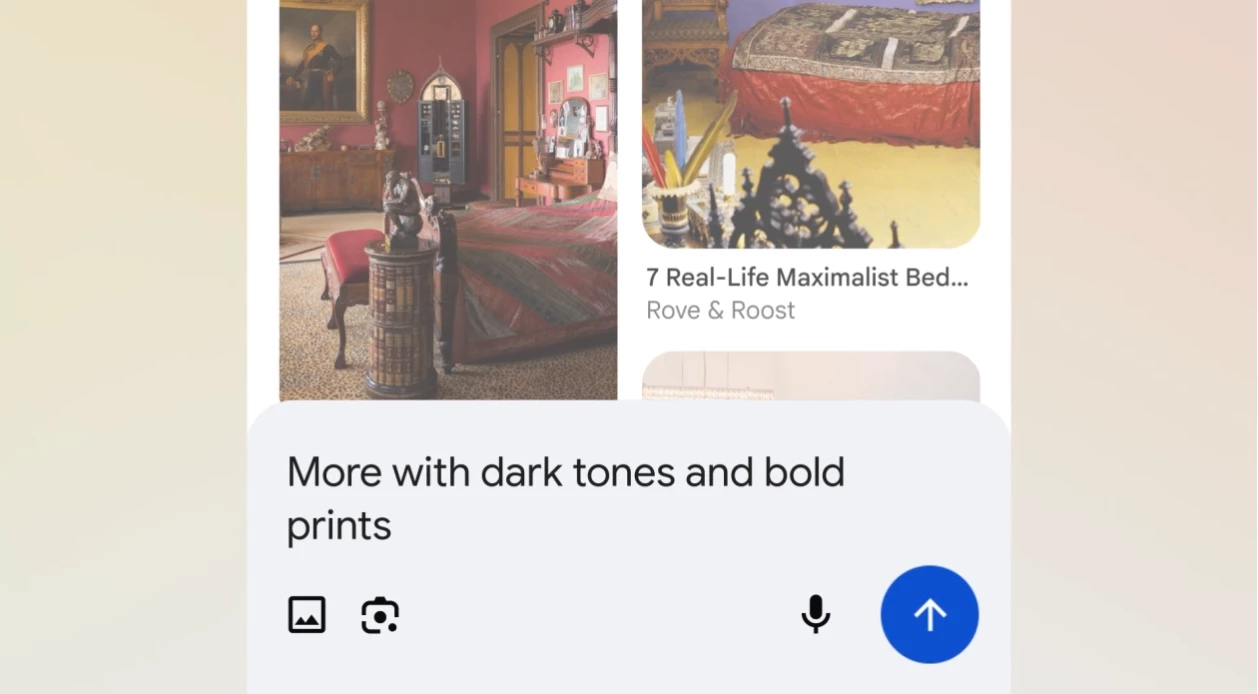
For example, a user can search for “winter coat for men,” and AI Mode will provide shoppable options.
If the results presented don’t cut it, users can simply input “I prefer double-breasted,” and AI Mode will suggest options that meet their new criteria.
The update rolled out in the U.S. last September 30, 2025 and will roll out elsewhere soon.
That subtle change marks a profound turning point.
For decades, B2B brands have optimized their online presence around words: keywords, white papers, blog posts, meta tags, etc.
Thanks to this latest update to AI Mode, visuals are starting to become a new playing field for discoverability.
B2B marketers now find themselves in a market where design hierarchy and visual intent carry as much weight as keywords.
“Visuals used to be about aesthetics. Now, it’s more concerned about being understood. Both humans and algorithms are trying to decide whether what they’re seeing is worth their time. This calls for an even more cohesive and holistic approach to UX hierarchy,” says Daniela Warren, Design Director at Bop Design.
“The cleaner and clearer it is, the more confidently AI can map intent and value.”
Building Visual Hierarchies That AI and Humans Understand
AI is becoming increasingly adept at understanding conversational queries as well as the structure of a page.
In other words, it’s capable of noticing whether a hero image feels informative or decorative, whether spacing implies order, and whether color enhances or distracts.
As such, visual hierarchy must guide and appeal to both humans and algorithms.
To design for this new audience, B2B brands should start reassessing how:
- Information is arranged on their websites
- Visuals direct attention
- Every element contributes to the overall UX
To be more specific, brands should prioritize the following:
- Leading with clarity: Above-the-fold visuals should instantly communicate purpose and value. Visitors, both human and algorithmic, should know what the company does within seconds.
- Prioritizing visual weight: Use contrast and spacing to guide attention naturally. Strategic use of negative space can help both people and AI recognize what matters most, preventing key information from blending into background noise.
- Simplifying interactions: Overdesigned pages make people think too hard. Clear calls-to-action and intuitive layouts now serve as indicators of authority. Each click or scroll should feel purposeful, reinforcing a sense of confidence and direction.
- Auditing image metadata: Despite advancements in AI, algorithms still need metadata to understand visuals fully. However, image titles and descriptions can now be more descriptive to provide deeper context to both users and AI.
These refinements may seem small, but they accumulate into something powerful.
The sites that both people and machines understand most easily are the ones that earn trust fastest.
Design for Conversational and Contextual Discovery
AI search has entered its conversational phase.
Queries now sound less like commands and more like dialogue, as evidenced in Google’s AI Mode update.
With such a scenario playing out more often, design must now assume the role of interpreter, as visuals, structure, and metadata all become part of a silent conversation about expertise and intent.
When AI connects a business with a query, the design should reinforce that connection by echoing the problem, the process, and the solution.
UX design can accomplish this through:
- Contextual visuals: Use images that align with real user intent, like products in use, teams solving problems, or services in action. Visuals that illustrate outcomes help AI match the page with conversational queries.
- Responsive hierarchy: 50% of users browse on mobile. Ensure layouts adjust seamlessly to devices and screen sizes. Search engines now assess how design performs across contexts, rewarding consistency in clarity.
- Semantic tagging: Label and structure every visual asset with relevant, machine-readable data. This helps AI understand not just what appears on the page but why it matters.
“We’ve realized that designing for AI and humans at once requires us to be disciplined and proactive.
You have to keep testing your assumptions, because the way people search changes as fast as the technology interpreting them,” Warren says.
Turn Design Into a Competitive Signal
The question that drives good UX design shouldn’t be “does this look good?” but “does this help both man and machine understand us faster and more clearly?”
Why? Companies that organize information with intention are perceived as more reliable both by audiences and algorithms.
A few practical questions can help guide the process:
- Do the first seven seconds of the homepage communicate purpose without confusion?
- Do the visuals present on the site actually reinforce your company’s expertise?
- Are navigation paths short, logical, and supported by visual cues?
Companies that can answer “yes” to all three are likely already ahead.
Those who cannot should treat this as their new UX and SEO checklist.